GPS Track Editor
Welcome to the home of the GPS Track Editor software, a cutting-edge tool designed for Windows 10 ... Developed by the innovative team at GPS Track Editor, this software is a comprehensive solution for all ...

PhotoFlare Lens is a RAW photo editor for photographers who want to develop camera originals without using a large, all-purpose suite. It offers exposure, white balance, highlight and shadow controls, tone curves, colour grading, cropping and straightening. Edits remain separate from the original, and standard XMP instructions can be opened by compatible editors such as Lightroom and darktable. A live histogram and locally read EXIF data support image adjustments and camera-setting comparisons.
| Author: | PhotoFlare |
| License: | Freeware |
| Price: | FREE |
| Released: | Oct 5, 2026 |
| File size: | 47.50 MB |
| Downloads: | 91 |
| Keywords: | edit RAW, PhotoFlare Lens free download, xmp photo editing, photo exposure adjustment, exposure, contrast, freeware RAW photo editor, non-destructive editing, RAW, non-destructive raw editor, RAW editing, raw white balance editor, raw photo editor, raw image editing, RAW photo adjustme, download PhotoFlare Lens, editor, non-destructive RAW editing, PhotoFlare Lens, Windows RAW photo editor |
| Author URL: | https://photoflare.io/ |
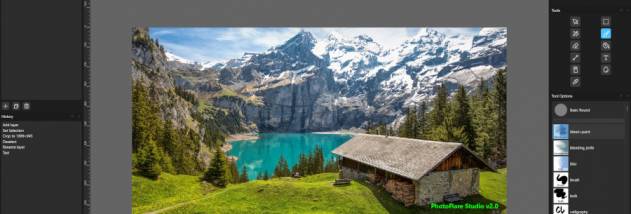


PhotoFlare Lens is a RAW photo editor for photographers who want to develop camera originals without taking on the complexity of a large, all-purpose editing suite. It opens unprocessed RAW files directly and keeps the original image unchanged while edits are made. Adjustments are stored separately, so settings can be revised or discarded without damaging the source photo.
Its development controls cover exposure, white balance, highlights, shadows, tone curves and colour grading. These tools help correct brightness and colour, recover detail in light or dark areas, and shape the image's overall tone. A live histogram provides a view of tonal distribution while editing, making it easier to spot when highlights or shadows are losing detail.
Lens also includes cropping and straightening tools, including automatic correction for a crooked horizon. It reads EXIF information from the RAW file locally, without requiring an internet connection. Camera settings such as shutter speed, ISO and aperture can help explain why a photo appears blurry or support comparisons between similar shots. The built-in browsing workflow lets users move through photos and select images to develop.
The editor handles RAW formats from a broad range of camera makers, including Canon, Nikon, Sony, Fujifilm, Panasonic, Olympus, Leica and Hasselblad. When adjustments are saved as standard XMP instructions, compatible RAW applications can read them, allowing work to continue in programs such as Lightroom or darktable. This provides a way to use Lens for initial development without tying the editing process exclusively to it.
PhotoFlare Lens is freeware for 64-bit Windows 10 and Windows 11. It is suited to photographers who need core RAW development controls, a straightforward way to review camera files, and a non-destructive editing workflow rather than a full professional photo suite.