ClapClip AI
... restores old footage and upscales resolution with AI super-resolution, all locally on your GPU. It also has offline Whisper-based transcription that turns audio and video ...

SUPER is a freeware Windows media player and conversion interface built around tools such as FFmpeg, MEncoder and MPlayer. It plays a broad range of audio and video inputs and converts files to most of its supported formats. Users can choose codecs and adjust frame size, frame rate, video and audio bitrates, sampling rate and channels. Drag-and-drop batch processing helps handle multiple files.
| Author: | eRightSoft |
| License: | Freeware |
| Price: | FREE |
| Released: | Nov 26, 2021 |
| File size: | 112.00 MB |
| Downloads: | 597 |
| Keywords: | SUPER, Player, video format converter, multimedia converter, Video player, Video encoder, super media converter, audio video encoder, media player and encoder, x64 software, ffmpeg conversion interface, eRightSoft, batch video conversion, Encoder, Renderer, Video converter, Windows 10, user-friendly interface |
| Author URL: | http://www.erightsoft.com |

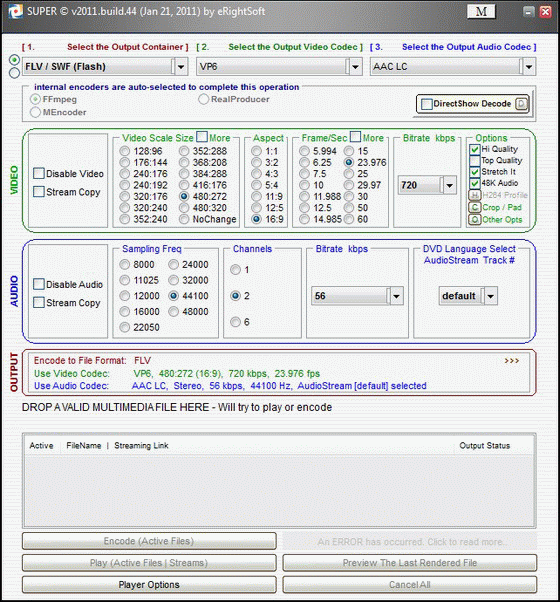



SUPER, short for Simplified Universal Player Encoder & Renderer, is a Windows media player and conversion interface for people who need to play or transcode files in a range of audio and video formats. It provides a graphical way to work with media tools including FFmpeg, MEncoder and MPlayer, bringing playback and encoding options together in one application rather than requiring users to enter commands manually.
For playback and input, SUPER handles many common and older media types. Video examples include AVI, FLV, MOV, MP4, MPEG, VOB, WMV, ASF, 3GP, OGG, QuickTime, RealMedia and Flash files. Supported audio inputs include MP3, MP2, AC3, AMR, OGG, RA and WMA. This range can help when opening files created by different devices, applications or media workflows, including formats that are not supported by every player.
The conversion workflow lets users choose an output format and select from available video and audio codecs. Video settings include frame size, frame rate and bitrate; audio settings include sampling rate, channel count and bitrate. These controls allow the output to be adjusted for different playback needs, file sizes or quality targets. SUPER prepares the encoding commands internally, so users can set key parameters through the interface without constructing those commands themselves. Conversion is available to most, rather than necessarily all, of the formats it supports as input.
Files can be added by drag and drop, and SUPER supports processing multiple files in a batch. That makes it useful for converting a collection of clips or audio tracks with a consistent set of output settings, as well as handling an individual file. The choice of codecs and adjustable encoding parameters gives more control than a simple one-click converter, while the graphical interface makes the underlying media tools accessible to users who prefer not to work at a command prompt.
SUPER is freeware and is intended for Windows. The supplied operating-system information lists Windows Vista, Windows 7, Windows 8 and Windows 10, including their x64 editions; it does not establish compatibility with Windows 11. Its format and codec options can be useful for general playback, format changes and preparing media for applications or devices that require a particular encoding. Available output formats and codec choices depend on the conversion being performed.