Transmutr for Windows 10 - Full description
Transmutr is a desktop utility for preparing 3D assets for use in SketchUp. It is aimed at SketchUp users who need to bring models from other file formats into a project, adjust their scale or geometry, and manage materials before importing the result. The software accepts 3DS, DAE, FBX, OBJ and STL files, and can also import Megascans assets directly from Quixel Bridge. Files can be opened by dragging them into the interface or by browsing to their location.
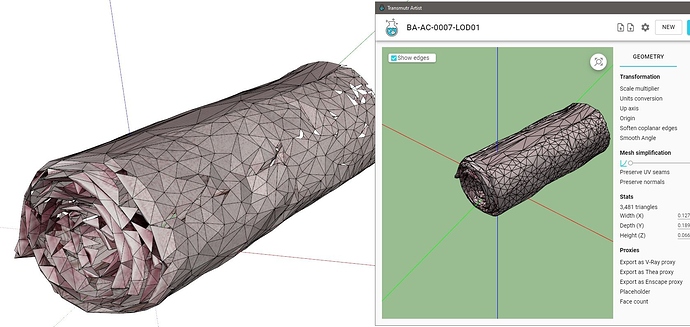
A model preview helps users inspect an asset before conversion. The view can be panned and orbited in a manner similar to model navigation in SketchUp, making it easier to check orientation and shape. Transmutr provides controls for scale multiplier, conversion units, up axis and model origin. Setting the appropriate units and orientation helps preserve the intended size and placement when the converted asset is brought into a SketchUp scene. The interface also reports overall dimensions and triangle count.
For geometry that is too detailed for a project, a mesh simplification slider reduces the face count while aiming to retain the original shape. This gives users a way to balance visual detail against model complexity. Material settings can be reviewed and edited within the same workflow: users can change material names and types, adjust color, bump, opacity and reflection, and load bitmap files for maps. These controls are useful when source assets need material cleanup or adjustment to suit a SketchUp scene.
Transmutr can export models as proxies for V-Ray, Thea or Enscape. In this workflow, the rendering engine uses the high-quality original asset while SketchUp displays a lighter placeholder, helping keep the working model more responsive. The resulting SKP proxy file is intended to be imported as a component into another model, rather than opened on its own. This approach is suited to scenes containing detailed assets that would otherwise add substantial geometry to the SketchUp workspace.
The software supports common asset-conversion and scene-preparation tasks, including importing downloaded models, checking dimensions, reducing mesh complexity and preparing renderer proxies. Transmutr is trialware and runs on 64-bit Windows 10 and Windows 11. Its conversion and editing functions are focused on preparing assets for SketchUp rather than replacing a general-purpose 3D modeling application.