Macro Recorder
Macro Recorder is a Windows automation tool for people ... recording can capture the actions needed for a macro while limiting unnecessary steps, which can make recordings ...

Macro Deck turns a Windows PC into a customizable remote control pad. Users build decks of buttons for commands and actions, then access them from an Android companion app or a modern browser on a handheld device. Buttons can control media playback and work with OBS Studio, Spotify, Twitter and Twitch. Custom syntax and rules support more tailored actions, and supported GIF images can be added to buttons. Multiple devices can connect at once, while accounts can keep several decks organized.
| Author: | Macro Deck |
| License: | Open Source |
| Price: | FREE |
| Released: | Oct 15, 2026 |
| File size: | 99.50 MB |
| Downloads: | 404 |
| Keywords: | Command, Macro Pad, Macro Deck free download, Macro, custom button deck, remote pc control, Macro Deck, macro deck, Macro Automation, pc macro pad, stream deck controls, Macro Tool, macro automation, Pad, Automate, download Macro Deck |
| Author URL: | https://macrodeck.org/ |
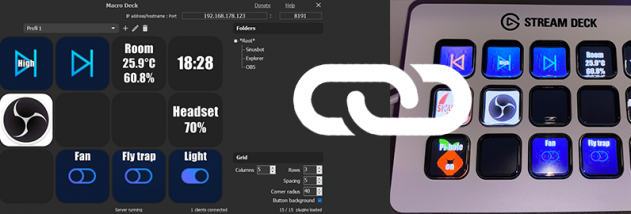


Macro Deck turns a Windows PC into a remotely controlled button pad. It is intended for people who want quick access to computer commands and app actions without switching to the relevant window or searching through menus. Decks are built from customizable buttons in the desktop application, then opened on a handheld device through a modern web browser or the Android companion app.
Each button can be assigned an action, from straightforward commands to more involved setups using syntax and rules. For media services, common controls include play, pause, stop and next or forward actions. Macro Deck can also work with OBS Studio and services such as Spotify, Twitter and Twitch, making a deck useful for controlling a stream, managing playback or triggering frequent tasks. Service-specific actions may require the relevant account credentials.
The interface is designed to keep deck creation manageable: buttons can be configured for particular uses and decorated with supported GIF images. Users connect a device by entering the IP address shown in the Macro Deck window. The desktop application can serve multiple connected devices at the same time, so a phone, tablet or other browser-equipped device can act as a control surface. Accounts can hold multiple decks, and separate users on one computer can keep their decks distinct.
Macro Deck is suited to streamers who want controls close at hand, people who use media or social services while working, and anyone looking to turn repeated computer actions into accessible buttons. Its value depends on the actions and services a user sets up; a simple deck can provide basic controls, while custom syntax and rules allow more tailored button behavior. The browser-based option also makes the deck accessible from devices beyond Android phones and tablets.
The software is open source and free to use. The desktop application is for 64-bit Windows 10 and Windows 11, while the companion app is available for Android. A modern browser can be used instead of the companion app. The computer and control device need a network connection that allows the device to reach the IP address displayed by Macro Deck.