Sony Vegas Movie Studio HD
Welcome to the download page for Sony Vegas Movie Studio HD, a top-notch video editing software developed by Sony Creative Software Inc. This powerful tool is designed ...

Vegasaur extends Vegas Pro with scripts and utilities for video editors who want to reduce repetitive work. Its tools cover batch rendering, post-render actions, project checks and backups, snapshots, pan and crop adjustments, event properties, media replacement, markers and effects. Presets Manager transfers Vegas Pro presets, while one-click scripts handle common editing tasks. Archive Project gathers a project and its media into a chosen folder. Vegas Pro 14 or newer is required.
| Author: | Vegasaur |
| License: | Trialware |
| Price: | $99.95 |
| Released: | Mar 1, 2021 |
| File size: | 57.00 MB |
| Downloads: | 341 |
| Keywords: | media, video, vegas pro extension, Windows 10 compatible, editor, vegas editing scripts, Vegasaur, Sony, manager, Vegas Pro add-on, vegas batch rendering, time-saving toolkit, video editing automation, vegas media replacement, vegas project backup, productivity enhancement, video editing software |
| Author URL: | https://vegasaur.com/ |




Vegasaur is an extension for Vegas Pro, aimed at editors who want to automate routine work and manage complex video projects more efficiently. It adds a collection of scripts and utilities to the editing application, covering rendering, project checks, media handling, timeline operations and preset management. Its tools use Vegas Pro's editing and scripting environment and are integrated into the editor's workflow.
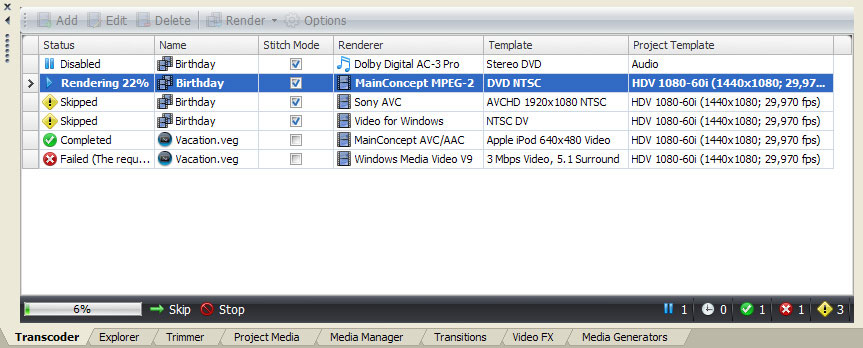
For repetitive output tasks, Transcoder batch-renders projects and can automate recurring production processes. Render Assistant runs chosen actions when rendering finishes, such as shutting down the computer, playing a sound or sending an email. Auditor checks a project for common problems, while Backups helps protect project files from accidental loss or damage. Snapshots provides an alternative way to work with project snapshots without depending on the current preview settings.
Several tools focus on editing and organizing project contents. Pan/Crop Assistant extends the built-in pan and crop workflow, with tools intended to make adjustments across many clips easier. Quick Properties speeds up changes to event and media properties and supports timeline placement and transition creation. Replace Media can swap media files in batches, while Markers provides shortcuts for common marker tasks. Effects applies selected presets to media, events, tracks or a whole project, and lets editors add, remove, reorder, enable or bypass effects.
Presets Manager exports, imports and transfers many Vegas Pro presets, useful when moving setups between systems or preserving reusable settings. A set of roughly 40 one-click scripts handles common editing operations, reducing the need to repeat manual steps. Archive Project copies a project and its media files to a chosen folder, helping gather the materials used by an edit for storage or transfer.
Vegasaur is trialware and requires Vegas Pro 14 or newer. It is intended for Windows systems, including Windows 10 and Windows 11. Because it operates as an extension to Vegas Pro, it is useful to editors who already work in that application and want a broad set of workflow, project-maintenance and rendering utilities in one toolkit.