Free Video to MP3 Converter 5.0.92.607 review by Short (Jun 17, 2016)

Support for many video formats, easy to use.

Free Video to MP3 Converter extracts audio from AVI, MPG, MP4, WMV, MOV, FLV and other video files, then saves it as MP3. Users can choose high, standard or economy quality, adjust settings in the preset editor, or select advanced LAME and lossless encoding options. Single-file and batch conversion are supported, and the program adds title information and artwork captured from the video.
| Author: | Digital Wave Ltd |
| License: | Freeware |
| Price: | FREE |
| Released: | Nov 11, 2014 |
| File size: | 27 kB |
| Downloads: | 2357 |
| Keywords: | Free Video to MP3 Converter, avi to mp3, video to mp3 converter, extract audio, extract audio from video, Digital Wave Ltd, audio extraction, video conversion, extract mp3, Windows 10 compatible, DVDVideoSoft, wmv to mp3, video to mp3, batch mp3 conversion, flv audio extractor, mp4 to mp3 converter, flv to mp3 |
| Author URL: | http://www.dvdvideosoft.com/ |
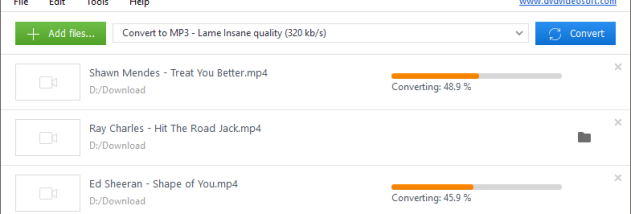

Free Video to MP3 Converter extracts audio from video files and saves it as MP3. It is intended for people who want to keep a soundtrack, song, speech or other audio from a video without converting the entire video for playback. The program accepts formats including AVI, MPG, MP4, WMV, ASF, MOV, QT, DVR-MS, 3GP, 3G2, AMV and FLV, covering a range of common and older video types.
The conversion workflow offers high, standard and economy quality presets, letting users balance audio quality against file size. For finer control, the preset editor can modify an existing setting or create a new one. The converter also provides Extreme and Insane LAME encoder presets for high-quality MP3 encoding, as well as lossless encoding. These options make it possible to choose a straightforward preset for routine conversions or adjust encoding settings for a particular project.
Files can be processed individually or in batches. Single-file conversion suits occasional extraction, while batch mode is useful when converting several videos with the same settings. The program automatically fills the MP3 title tag and adds artwork by taking a snapshot from the middle of the source video. The resulting tags and image can be viewed in compatible music players such as iTunes and Winamp, or in a Windows Explorer folder.
Typical uses include making audio versions of video clips, extracting music or spoken content for a portable music library, and preparing multiple video files for audio playback. Since the output is MP3, it can be organized with other music files and played in software that supports the format. The included artwork and title information can also make converted tracks easier to identify in a music collection.
Free Video to MP3 Converter is freeware from Digital Wave Ltd and is available in multiple languages, including English, French, German, Spanish, Chinese, Japanese and Russian. It has no special system requirements stated and is designed for Windows. The program converts audio from video files; it does not serve as a general-purpose video editor or video-to-video converter.
Support for many video formats, easy to use.