VinylStudio for Mac for Windows 10 - Full description
VinylStudio is an audio transfer and cataloging program for people who want to preserve vinyl records and cassette tapes as digital recordings. It brings recording, track editing, sound cleanup and collection organization into one workflow, helping users turn analog albums into files that are easier to store, browse and play. Its tools suit both occasional transfers and larger collections that need consistent track names and album information.
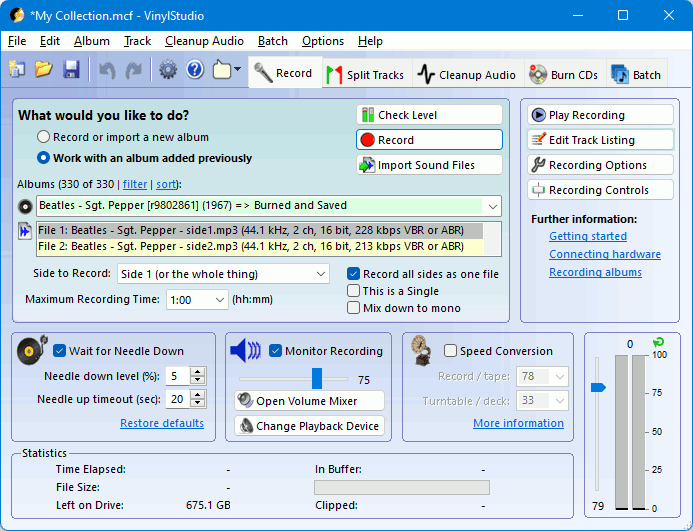
The recording process captures audio from a connected turntable or tape player through compatible hardware, such as a USB turntable or audio interface. VinylStudio can split a side into separate tracks, so an album recording does not have to remain one long file. Fade-in and fade-out effects can be applied to track endings and beginnings, while editing tools help prepare the recordings for listening. The program supports a range of audio formats, allowing users to choose files suited to their playback setup.
Older records and tapes can contain surface noise and other unwanted sounds. VinylStudio includes restoration tools aimed at reducing clicks, pops and hiss, letting users clean up transfers while retaining the character of the original audio. After recording and editing, album details can be added or corrected with metadata tools. Album artwork, track listings and other information help make the resulting library easier to identify and navigate. Online album information can also be imported, reducing the need to enter every detail manually.
A built-in collection database keeps albums and tracks organized. Search and filter functions help locate particular recordings, especially when a library grows beyond a handful of transfers. This makes VinylStudio useful not only for creating digital copies, but also for maintaining a searchable record of a music collection. A guided layout supports the transfer and editing workflow, and tutorials and support resources are available for users learning the process.
VinylStudio is relevant to listeners preserving personal records, collectors cataloging albums and anyone transferring cassette recordings to a digital library. It works with suitable audio input hardware and is available for Windows 10 and Windows 11; the supplied operating-system information also includes older Windows releases. The software is offered as a demo. Users should confirm that their recording hardware and preferred audio format fit their setup before beginning a large transfer project.