CPU Limiter
... users who want to take control of their CPU usage and optimize their system performance. CPU Limiter is ... powerful tool that allows you to limit the CPU usage of any process running on your system. ...

WebTemp collects hardware readings from SpeedFan and other compatible monitoring tools, then combines them with system data such as CPU and memory load, network traffic and battery capacity. It creates visual statistics for recent activity and the past 24 hours, with compact desktop displays, FTP uploads, email reports and alerts for high temperatures or low fan speeds.
| Author: | Daniel Karsubka |
| License: | Freeware |
| Price: | FREE |
| Released: | Nov 3, 2014 |
| File size: | 1.78 MB |
| Downloads: | 314 |
| Keywords: | x64 compatible software, temperature tracking, cpu temperature monitor, temperature, temperature chart software, CPU temperature, hardware temperature logging, Daniel Karsubka, cpu monitoring tool, system monitoring statistics, temperature report, CPU, fan speed monitor, read temperature, hardware analysis, WebTemp, read, system monitoring |
| Author URL: | http://www.webtemp.org/ |
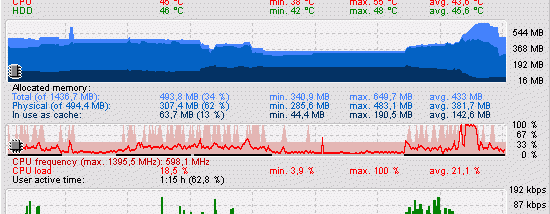

WebTemp is a hardware monitoring and statistics utility for users who want to track computer temperatures and system activity over time. It collects CPU temperature, voltage and fan-speed readings from SpeedFan or other compatible hardware-monitoring tools. WebTemp also reads several system metrics on its own, so its reports can combine sensor data with processor, memory, network and battery information.
The program turns collected readings into visual statistics covering recent activity, with a separate view for the past 24 hours. These charts help users review changes rather than relying only on a live sensor value. A banner-style display can focus on temperatures or network traffic, while the compact Light view shows current temperatures and fan speeds. Both small displays can sit transparently over the desktop, making them useful for keeping an eye on activity while working.
WebTemp can save statistics, upload them to an FTP server or send them by email. Users can customize the names and colors assigned to sensors and statistics, and a separate system-information window shows details such as real-time CPU frequency. The program can also email alerts when CPU temperature rises too high or fan speed falls too low; it can be configured to shut down the computer in response to these conditions.
These features suit users monitoring a workstation or server remotely, checking cooling performance, or keeping records of system behavior. Tracking CPU and memory load, network traffic, hard-disk memory and notebook battery capacity alongside sensor readings can help put temperature changes in context. The graphical displays offer a quick overview, while saved or sent statistics make it possible to review readings away from the machine.
WebTemp is freeware for Windows, including Windows 10. CPU temperature, voltage and fan-speed readings require an external hardware-monitoring tool such as SpeedFan; WebTemp reads the other listed system data itself. The program is designed to use little processor time and memory. Its installer does not place files in the Windows or system directories, and uninstalling removes WebTemp's registry settings.