XAMPP portable
XAMPP Portable packages the Apache web server with the ... public server. Developers can also use a separate XAMPP folder to keep experiments apart from other projects, ...

XAMPP is a free, open-source package for creating a local web server. It combines Apache with a database server, PHP and Perl, giving developers an environment for building and testing dynamic websites without uploading projects to a live host. Its control panel starts and stops components and provides access to configuration; services can optionally be installed as Windows services.
| Author: | Apache Friends |
| License: | Open Source |
| Price: | FREE |
| Released: | Oct 24, 2022 |
| File size: | 147.00 MB |
| Downloads: | 778 |
| Keywords: | website testing server, Windows 10, server utility, Apache, Apache Friends, open-source development, web server solution, xampp download, apache control panel, Apache distribution, web server, web-server, XAMPP, php development environment, apache server bundle, local web server, x64 software |
| Author URL: | https://www.apachefriends.org/ |

XAMPP is a free, open-source package for setting up a local web server. It brings together Apache, a database server, PHP and Perl so website developers can run and test server-based projects on a personal computer. Instead of configuring each component separately, users can install the bundle and manage its services from one control panel. It is suited to learning web development, building sites locally and maintaining projects before they are deployed to a public server.
Apache handles requests from a browser and serves website files from the local machine. With Apache running, a developer can open a project in a browser and check its pages without uploading them to a hosting account. PHP lets the server execute application code, while Perl supports projects that use Perl scripts. The database component provides storage for sites and applications that need to save and retrieve structured information, such as content management systems and other dynamic web projects.
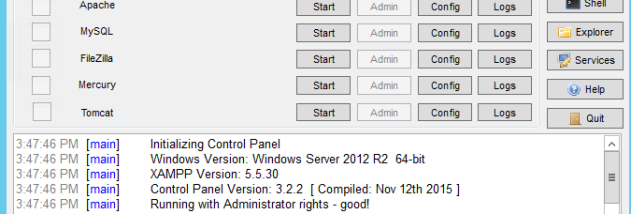
The XAMPP control panel provides a central place to start and stop the server components and access their configuration. This makes it possible to run only the services needed for a particular task, then stop them when testing is complete. During installation, components can optionally be registered as Windows services; this choice can also be changed later through the control panel. Keeping the server on the development computer helps separate experimentation from a live website and makes it easier to repeat tests as files or settings change.
Typical uses include creating a local environment for PHP development, checking website changes before publishing, learning how web servers and databases work, and testing maintenance tasks. A local setup can also help developers reproduce issues without exposing unfinished pages to the internet. Because it is intended as a development and testing environment, XAMPP should be configured with care before any component is made accessible beyond the local computer.
XAMPP is available for Windows, including Windows 10 and Windows 11, and is distributed as open-source software at no cost. Its bundled components provide a convenient starting point, though projects may require additional setup or configuration to match their eventual hosting environment. The control panel is the main interface for managing server processes and settings, while website files and application code are handled in the relevant local folders.