Print Distributor
Print Distributor is a Windows print-management tool for organizations that need to direct, archive ... process output from desktop applications. It creates virtual printers that appear to users like ordinary printers, so ...

Xlpd turns a Windows PC connected to a printer into an LPD network print server. It receives print jobs from remote systems, including UNIX and Linux hosts, so users can send output to a local printer without manually downloading files. Options include CRLF conversion, an appended form-feed, font and margin settings, LPQ/LPSTAT command support, a configurable LPD port, and a window for errors and logs.
| Author: | NetSarang, Inc. |
| License: | Trialware |
| Price: | $149.00 |
| Released: | May 3, 2024 |
| File size: | 29.80 MB |
| Downloads: | 345 |
| Keywords: | windows print server, Windows 10 compatibility, Printer, remote server management, linux network printing, print, line printer daemon, x64 software, Line Printer Daemon, remote printing, print server, Xlpd, data communication, LPD, lpd print server, unix print jobs, NetSarang, print remote |
| Author URL: | https://www.netsarang.com/ |
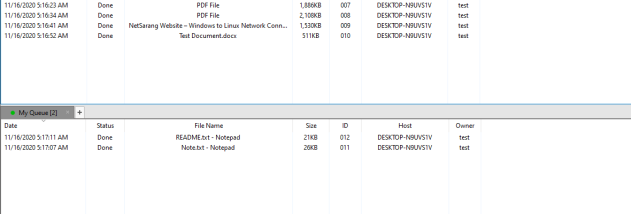

Xlpd is a Windows Line Printer Daemon (LPD) application that lets a PC connected to a printer act as a network print server. It is intended for users who need to send print jobs from remote systems, including UNIX and Linux machines, to a locally attached printer. Rather than downloading remote files to the Windows computer and opening them there, a user can submit print data through the remote system's print command and have Xlpd receive and process the job.
The program listens for incoming LPD requests and routes their print data to the local printing setup. Its print configuration options help adapt output to the printer and the source material. CRLF conversion can adjust line endings for compatibility between systems, while an optional form-feed character can be appended to help signal the end of a page or job. Font and margin settings provide further control over how received text is laid out. These options are useful when remote output does not arrive with formatting that matches the local printer's defaults.
Xlpd also supports UNIX LPQ and LPSTAT commands, which can be used to check print queue status from compatible remote environments. The LPD service normally uses port 515, but Xlpd allows a different port to be configured when that default conflicts with network rules or another service. A message window displays errors and logs, giving administrators a place to review service activity and diagnose problems with incoming jobs or printing.
A typical setup places Xlpd on a Windows PC with access to a printer, then configures a remote UNIX or Linux host to send jobs to that computer. This workflow can be useful in mixed-platform offices, labs, or other networks where users work on remote systems but need paper output from a Windows-connected printer. NetSarang's Xmanager and Xshell are cited as ways to connect to remote systems and issue print commands from a terminal; Xlpd handles the receiving and local printing side.
Xlpd is trialware and is available for Windows, including Windows 10 and Windows 11. It is a network printing utility rather than a general document editor: the remote system supplies the print job, while Xlpd provides the LPD service, selected formatting adjustments, queue-command support, and activity messages. Successful use depends on network access between the sending host and the Windows PC, a reachable configured LPD port, and a working local printer.