Adobe Creative Cloud Cleaner Tool for Windows 10 - Full description
Adobe Creative Cloud Cleaner Tool is a command-line utility for removing leftover files and settings from certain Adobe products after they have been uninstalled. It is intended for Windows users troubleshooting an incomplete removal or preparing a system for a fresh Adobe installation. Unlike a general-purpose cleaner, it focuses on supported Adobe software and does not act as a routine maintenance tool for unrelated applications.
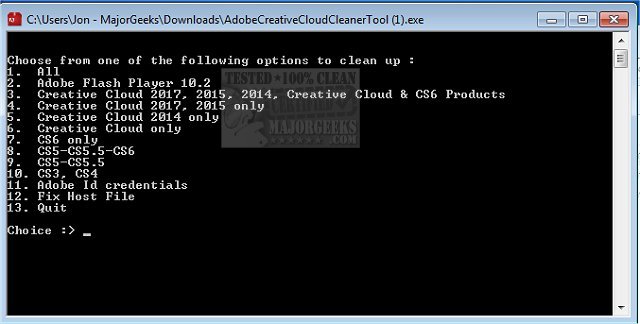
The tool guides the cleanup through successive choices entered in its command-line window. Users select the Adobe product or cleanup operation they want to run, then follow the prompts to confirm the action. This provides a targeted way to remove residual data that may remain after standard uninstallation, such as files or registry entries associated with supported Creative Suite and Creative Cloud products. It can also remove data for selected Flash Player installations.
A separate option clears Adobe ID credentials stored on the computer. This can be useful when removing saved Adobe account information as part of a cleanup, rather than deleting only product-related remnants. The utility records details of its work in a log file, which can be reviewed to check what the cleanup processed. When the operation finishes, it reports the result; restarting Windows may be necessary for changes to take effect.
Typical uses include resolving problems caused by leftover Adobe components, clearing remnants before reinstalling a supported product, or removing stored credentials from a computer. The tool is designed for remnants of products removed through the usual uninstall process; it is not intended to remove Adobe software that remains installed. Because it performs targeted cleanup, users should choose the relevant operation carefully and review the result if troubleshooting continues.
Adobe Creative Cloud Cleaner Tool is freeware for 64-bit Windows 10 and Windows 11. Its command-line interface keeps the workflow focused on product selection and cleanup rather than offering broad system-cleaning settings. It is useful when Windows' standard uninstall process has not removed all supported Adobe data, but it is not a substitute for the normal uninstaller when the goal is to remove an installed application.