Windows 10
Windows 10 is Microsoft’s desktop operating system for personal computers, ... workloads depend on appropriate management, software and hardware. Windows 10 updates deliver fixes and refinements without necessarily changing ...

AeroZoom adds mouse-based controls to the Windows Magnifier for presentations and screen demonstrations. Mouse buttons and a large on-screen panel can zoom in, zoom out, reset magnification, and change magnifier settings. The panel appears beside the cursor, and extra buttons restore or stop Magnifier and launch Snipping Tool, WordPad, or Calculator. It is portable, open source, and includes an alternate executable for left-handed users.
| Author: | wanderSick |
| License: | Freeware |
| Price: | FREE |
| Released: | Apr 25, 2014 |
| File size: | 1.60 MB |
| Downloads: | 391 |
| Keywords: | screen zooming, windows magnifier controls, Enhance, wanderSick, Zoom, Windows Magnifier, AeroZoom, screen magnifier tool, Window Zoom, presentation mouse controls, mouse zoom utility, user-friendly interface, Windows 10, magnifier shortcuts, portable magnifier enhancement, Magnifier, magnification software, Enhanced Magnifier |
| Author URL: | http://wandersick.blogspot.com/ |
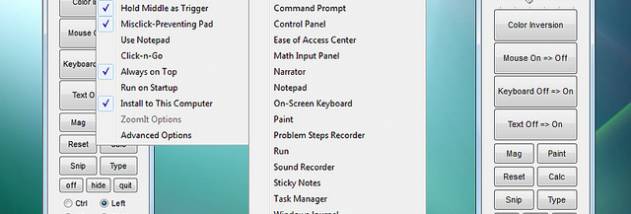

AeroZoom is a lightweight AutoHotKey utility that adds mouse controls to the Windows Magnifier. It is intended for presenters and anyone who needs to zoom in on screen content while keeping one hand on the mouse. Instead of relying on keyboard shortcuts or finding the Magnifier window, users can trigger common actions from mouse buttons and a compact control panel.
The utility maps frequently used presentation controls to mouse buttons and large AeroZoom panel buttons. These controls can zoom in, zoom out, or reset magnification, making it easier to adjust the view while speaking or demonstrating software. The panel appears beside the cursor when called from a mouse button, so its controls remain close at hand. Its buttons also provide direct access to sub-magnifier settings, which otherwise take several clicks to reach in Magnifier.
Additional panel controls help manage the magnifier and launch related tools. Show can restore a hidden Magnifier, Kill stops its process, and Reset applies default settings. Draw, Type, and Calc open Snipping Tool, WordPad, and Calculator, respectively. An alternate executable provides a layout for left-handed users. AeroZoom is portable, although it stores per-user settings in the Windows registry.
AeroZoom is suited to presentations, demonstrations, and other situations where screen magnification needs to be controlled without pausing to use a keyboard. It works with a mouse and is particularly practical with a wireless model, allowing the presenter to move around while operating the controls. The program is open source and free to use.
AeroZoom enhances the Windows Magnifier rather than providing a separate magnification engine. Its original design relies on the improved Magnifier introduced with Windows 7 and requires a Windows system newer than XP or Vista. The utility was written with AutoHotKey; the supplied program information identifies older Windows releases, so compatibility with current Windows editions should be checked before use.