Fakin The Funk
... Funk", an innovative software developed by the renowned Ulrich Decker Software Entwicklung. This Windows 10 compatible software is a must-have for all music enthusiasts and ...

AudioExpert organizes and merges music collections across multiple folders. It scans libraries for duplicate tracks using audio-stream checksums and tags, then compares bitrate, stereo mode, duration and sampling rate to help choose which copy to keep. AutoTagging can identify untagged files from their names and paths. Users can manage separate libraries, search phonetically, correct spelling variations, and update file names and tags when reorganizing tracks.
| Author: | Ulrich Decker Software |
| License: | Freeware |
| Price: | FREE |
| Released: | Jun 22, 2022 |
| File size: | 38.50 MB |
| Downloads: | 425 |
| Keywords: | music library manager, music collection, music organizer, duplicate finder, audio file organizer, AudioExpert, music library management, audio duplicate finder, music file tagger, audio quality enhancer, Ulrich Decker Software, cataloguer, organizer, normalizer, mp3 collection manager, merge music libraries, MP3 normalizer |
| Author URL: | https://udse.de/ |
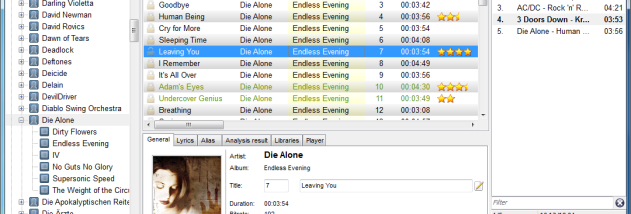

AudioExpert is a music collection manager for organizing and combining large audio libraries. It is intended for people who maintain multiple music folders and want to consolidate them, find duplicate tracks, and improve the organization of files and tags. The program supports common formats including MP3, WMA, OGG, FLAC, AAC, APE and MPP, and can work with libraries containing tens of thousands of tracks.
When scanning separate collections, AudioExpert compares tracks to identify duplicates and selects which copy to keep or import. Matching can use an MD5 checksum of the audio stream, recognized tags, or both. For competing copies, it evaluates properties such as bitrate, stereo mode, track length and sampling rate; a preview lets users inspect and adjust the choice before applying it. This helps combine archives while retaining a copy with better audio characteristics rather than adding every duplicate.
The integrated AutoTagging feature can identify music even when files have no tags. It uses information in file names and folder paths to recognize artist, album and track, so results depend on how those files are named and arranged. AudioExpert can also detect likely spelling variations in artist names and remember corrections, helping similar files be placed consistently during later imports. A phonetic search can locate an artist, album or title when its exact spelling is uncertain. Users can reassign a song or an entire album to another artist or album through drag and drop or a context menu; when changes are committed, the program can update the associated tags and file names.
AudioExpert supports a main collection as well as multiple additional libraries, which can represent subsets of a larger archive. These separate libraries can be synchronized with devices such as MP3 players, making it possible to maintain a smaller selection without treating it as the full collection. The scanning, duplicate review and library management tools are useful when merging folders from different drives, cleaning up an established catalog, or preparing a portable music selection.
The program is freeware and is available for Windows, including Windows 10 and Windows 11. Filename-based identification is not guaranteed to be correct, so recognized details and duplicate choices can be reviewed and corrected. AudioExpert remembers some corrections for future imports, but users should check results when reorganizing valuable or irregularly named collections.