PDF-XChange Pro
PDF-XChange Pro is a Windows PDF creation and conversion suite for people who need ... from office applications and other software into searchable PDF files. It combines a virtual PDF printer with ...

BookletCreator turns an existing PDF into a print-ready booklet by rearranging pages into the order needed for printing and folding. The offline edition works without an internet connection, processes files faster than the online service and has no input file size limit. It is designed for pamphlets, programs, handouts and other small folded publications.
| Author: | BookletCreator.com |
| License: | Demo |
| Price: | $19.95 |
| Released: | Jul 31, 2014 |
| File size: | 1.57 MB |
| Downloads: | 357 |
| Keywords: | reorder pdf pages, create, offline version, print folded booklet, booklet design tool, booklet printing software, create booklet from pdf, pdf page imposition, PDF, reorder PDF page, BookletCreator.com developer, x64 software, reorder, BookletCreator, book creator, pdf booklet maker, create book from PDF, Windows 10 compatibility |
| Author URL: | http://bookletcreator.com/ |
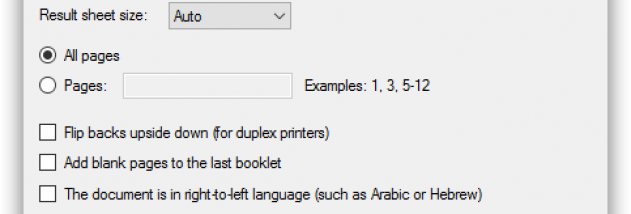

BookletCreator is a Windows utility for turning an existing PDF into a print-ready booklet. It is intended for people who want to print folded documents such as pamphlets, programs, manuals or small books without manually rearranging the pages. The software changes the page order so that sheets can be printed, folded and assembled into a correctly sequenced booklet.
To prepare a document, users open a PDF in BookletCreator and let the program impose its pages for booklet printing. The reordered output places pages that belong together on the same printed sheet, accounting for the way the sheets will be folded. This avoids the need to calculate page pairings or rearrange pages individually in a PDF editor. The resulting file can then be sent to a printer using the appropriate paper and duplex-printing settings, or printed in separate passes if the printer does not support double-sided printing.
The offline edition provides the same booklet-making features as the online service, while processing files locally on the computer. It works without an internet connection and has no input file size limit, which can be useful when preparing larger PDFs or working in places with limited connectivity. Since the source document remains a PDF, the utility fits into workflows that already use PDF files for sharing, archiving or printing.
BookletCreator can help with both occasional and repeated print jobs, including event programs, course handouts, community newsletters and personal booklets. It handles page order rather than the physical printing process, so users still need to choose suitable paper, printer settings and a folding method. A test print can help confirm that pages appear in the intended order and orientation before producing multiple copies.
The program is distributed as demo software. It is a desktop application for Windows, with support listed for Windows XP through Windows 10, including 64-bit editions where indicated. Its purpose is focused on PDF booklet layout rather than general PDF editing, so it is best suited to documents that are already prepared and need to be arranged for folded printing.