Digimizer
Digimizer is image analysis software for measuring and examining objects in photographs, ... reflect the scale of the particular image being analyzed. Image-processing controls include brightness and contrast adjustments, filters and ...

CellProfiler Analyst is an open-source application for exploring and classifying biological image data. Developed by the Broad Institute, it helps researchers review measured cell properties, identify patterns, and sort cells into phenotype categories. Its machine-learning classifier learns from examples labeled by the user, helping apply consistent classifications across large datasets. Plotting and image-browsing tools connect measurements with the cells behind them. It is commonly used with CellProfiler in high-throughput cell biology research.
| Author: | Broad Institute |
| License: | Open Source |
| Price: | FREE |
| Released: | Jul 22, 2025 |
| File size: | 264.00 MB |
| Downloads: | 167 |
| Keywords: | image analysis, cellprofiler analyst, high throughput image analysis, data visualization, download CellProfiler Analyst, quantitative measurement, biological research, analyze, phenotype classifier, phenotype classification software, user-friendly interface, Biology, phenotype, Broad Institute, classify phenotype, biological image analysis, cell phenotype classifier, measure phenotype, cell, CellProfiler Analyst, CellProfiler Analyst free download, open-source, cell image analysis, bioinformatic |
| Author URL: | https://cellprofiler.org/ |




CellProfiler Analyst is an open-source application for exploring and classifying data from biological images. Developed by the Broad Institute, it is intended for cell biologists and other researchers who need to review image-based experiments, find patterns in measured cell properties, and distinguish phenotypes. It is commonly used alongside CellProfiler, which extracts measurements from images for further analysis in Analyst.
The Classifier tool helps researchers sort objects into categories such as phenotypes. Users review example images and assign labels, then train a machine-learning classifier to recognize similar objects across a dataset. This approach can reduce repetitive manual screening and makes it possible to apply consistent classification rules to large collections of cells. Researchers can inspect the classifier's results and refine the training examples when the categories need adjustment.
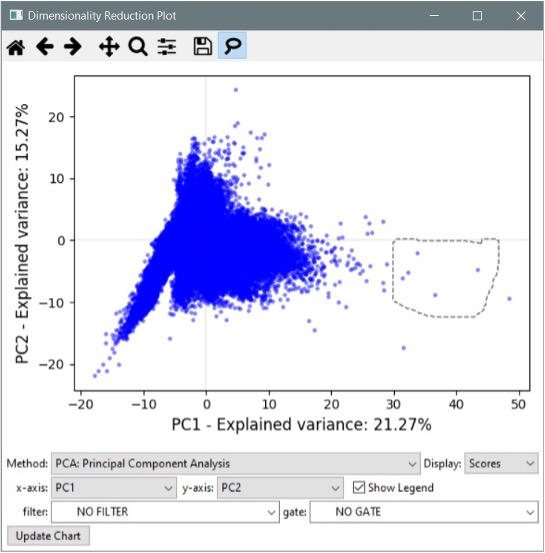
For exploring measurements, Analyst provides visual tools that let users compare properties and investigate how groups of objects differ. Plots can reveal relationships between measured features, while image browsing tools help connect a pattern in the data to the cells that produced it. Moving between numerical measurements and corresponding images is useful when a statistical difference needs to be checked against the underlying biological material, rather than interpreted from numbers alone.
These workflows support tasks such as comparing treatment conditions, screening for cellular responses, and examining morphological differences in high-throughput experiments. Researchers in drug discovery, genomics, and systems biology can use phenotype classification to narrow large image datasets to objects or groups that merit closer study. The software is an analysis and exploration tool: its value depends on the quality of the images, measurements, labels, and experimental design supplied to it.
CellProfiler Analyst is free and open source, and runs on Windows 10 and Windows 11, including 32-bit and 64-bit systems. It is designed for scientific image-analysis workflows rather than general photo editing. Researchers who are new to image-based analysis may need to become familiar with measured features and classifier training to interpret results appropriately; users already working with CellProfiler measurements can use Analyst to examine and classify those data interactively.