
ClickYes Pro Server Edition

ClickYes Pro Server Edition 3.9.3

Manage Outlook prompts across user accounts

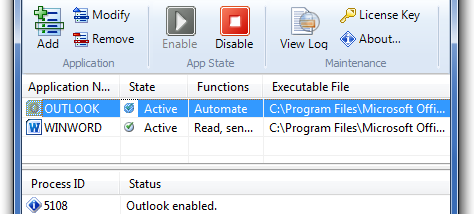
ClickYes Pro Server Edition helps administrators manage Microsoft Outlook security prompts across user accounts on a shared Windows computer. It applies a common configuration, installs add-ins for Outlook and Word to suppress warnings, and restricts settings and application-list changes to administrators. Profiles can be saved and imported for reuse.

ClickYes Pro Server Edition 3.9.3 details

Author:
License: Trialware
Price: $39.90
Released:
File size: 1.83 MB
Downloads: 272
Keywords: configure mail, ClickYes Pro Server Edition, enhance Outlook, x64 software, suppress outlook warnings, secure outlook, outlook security prompts, outlook configuration tool, outlook, storage, Outlook configurator, outlook email automation, outlook prompt manager, shared outlook settings, Windows 10, secure server management, ContextMagic.com, automated email handling, configurator, configure mail security
Author URL: https://www.contextmagic.com/
ClickYes Pro Server Edition screenshot
ClickYes Pro Server EditionOther E-Mail ToolsWindows XP, Windows Vista, Windows Vista x64, Windows 7, Windows 7 x64, Windows 8, Windows 8 x64, Windows 10, Windows 10 x64, Windows 11

User Rating: 0 (0 votes)

Windows 10

x32

Windows 10

x64

ClickYes Pro Server Edition Awards

Windows 10 download editor's pick

ClickYes Pro Server Edition for Windows 10 - Full description

ClickYes Pro Server Edition is a Windows utility for administrators who manage Microsoft Outlook on a shared or multi-user computer. It applies common configuration settings across user accounts and installs add-ins for Outlook and Microsoft Word to suppress security warning prompts. This can help reduce interruptions in workflows that rely on Outlook sending messages or exchanging data with other applications, while keeping configuration under administrator control.

Administrators can set up a shared profile rather than configure each account separately. The settings determine how the program handles Outlook security prompts, and administrators can add or remove applications from its permitted list. Regular users cannot change these settings, which helps maintain a consistent setup across accounts. The tool is intended for environments where repeated prompts interfere with routine email-related tasks, though suppressing warnings should be considered in light of the computer's security policies.

A configuration profile can be saved to a file and imported later, making it easier to reuse settings in another setup or restore a previous configuration. The interface also offers selectable skins for changing its appearance. Its controls are designed for straightforward configuration, so administrators can manage the shared profile without having to adjust every user account individually.

Typical uses include reducing prompts during automated or repeated Outlook email sending, supporting email merging, and avoiding interruptions during PDA synchronization workflows that use Outlook. The Server Edition is trialware from ContextMagic.com. It is available for Windows, including Windows 10 and Windows 11, and requires administrative privileges to change settings or maintain the application list. Because it changes how Outlook and Word security prompts are handled, administrators should configure it only for applications and workflows they trust.

ClickYes Pro Server Edition for Windows 10 - Post your review