Clipboard Remote
Clipboard Remote is a clipboard synchronization utility from NTWind Software for people who ... is intended to run in the background, so clipboard sharing can fit into everyday work without requiring ...

ClipboardFusion is a Windows system-tray utility that monitors copied text and removes formatting before it is pasted into another application. Users can scrub text automatically, trigger cleaning from the tray icon or assign hotkeys, and exclude selected applications. It can also remove HTML tags, replace clipboard text with predefined strings, and preview copied images or HTML color codes. Pressing Print Screen opens a screenshot preview that can be saved from its pop-up.
| Author: | Binary Fortress Software |
| License: | Demo |
| Price: | $19.00 |
| Released: | Oct 16, 2026 |
| File size: | 33.70 MB |
| Downloads: | 322 |
| Keywords: | ClipboardFusion, Viewer, remove text formatting, Clipboard Viewer, clipboard management tool, Binary Fortress Software, html tag remover, Clipboard Monitor, clipboard manager, Monitor, screenshot preview tool, Clear Clipboard, clipboard text replacement, Clipboard, text scrubbing feature, Windows 10 compatible, clipboard text cleaner, x64 architecture |
| Author URL: | https://www.binaryfortress.com/ |

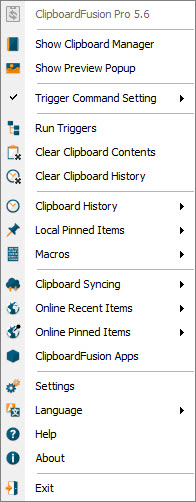
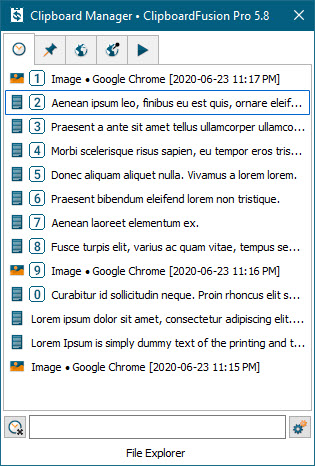

ClipboardFusion is a Windows utility that runs in the system tray and monitors copied text. It is useful for people who regularly move text between websites, email, documents and other applications, where copied formatting can be distracting or inconsistent. Instead of pasting rich text and then cleaning it manually, users can have ClipboardFusion remove formatting before the text reaches its destination.
Text scrubbing can run automatically whenever text is copied, or be triggered on demand by double-clicking the tray icon or pressing a configured hotkey. Hotkeys can also switch automatic scrubbing on or off, giving users control when some copied material needs to retain its formatting. An exclusion list lets specific applications bypass scrubbing, which helps preserve the normal clipboard behavior of programs where formatting is important. ClipboardFusion can also remove HTML tags, leaving page text without the underlying markup.
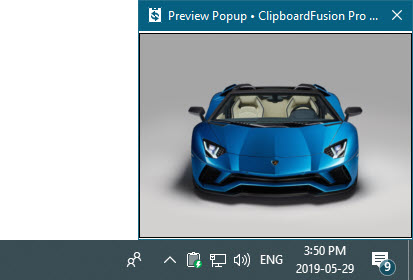
For recurring edits, replacement rules substitute clipboard text with predefined strings. This can standardize characters, such as changing typographic quotation marks to plain ASCII quotes, before the text is pasted. The utility can show small previews of copied images and HTML color codes, making it easier to identify clipboard content without opening another application. When Print Screen is pressed, a pop-up previews the captured image; right-clicking that preview saves the screenshot directly, without requiring an image editor for a simple capture.
These tools suit workflows that involve collecting text from formatted web pages, moving notes between applications, normalizing pasted content, or taking quick screenshots. Automatic cleaning reduces repeated formatting steps, while manual controls and application exclusions help avoid unwanted changes. Preview pop-ups provide a quick way to inspect image and color data on the clipboard, and replacement rules are useful when the same character substitutions are needed regularly.
ClipboardFusion is offered as demo software and runs on 64-bit Windows 10 and Windows 11, as well as Windows Server 2016, 2019 and 2022. It stays available from the system tray, with its main actions accessible through hotkeys and the tray icon. Its clipboard features focus on text cleanup, targeted replacements and lightweight previews rather than replacing a full text editor or image-editing application.