Batch Rename Tool for Windows 10 - Full description
Batch Rename Tool by TkoSoft is a versatile and efficient software solution designed to streamline the process of renaming multiple files simultaneously. Ideal for users who handle large volumes of files, such as photographers, digital content creators, and office professionals, this tool offers a robust set of features to enhance productivity and organization.
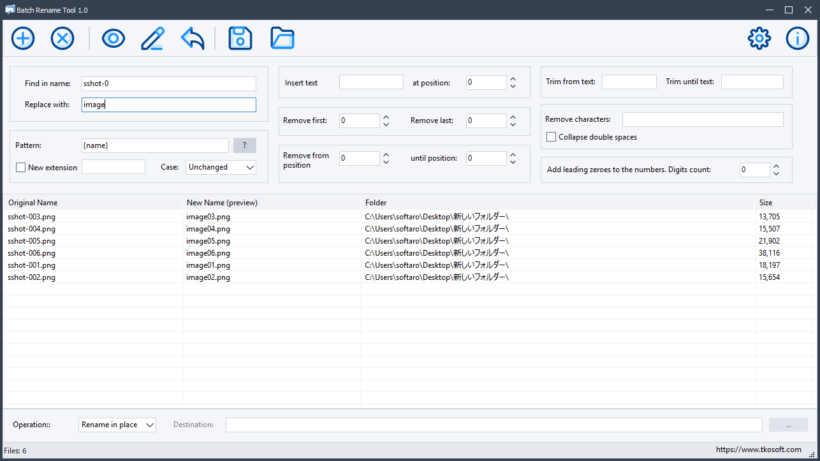
At its core, Batch Rename Tool provides users with the ability to rename files in bulk using a variety of customizable options. Users can easily modify file names by adding prefixes, suffixes, and sequential numbers, or by replacing specific text strings. This flexibility ensures that files can be organized according to personal or professional naming conventions, thereby improving file management and retrieval.
The software supports a wide range of file types, making it a versatile choice for different industries. Whether dealing with images, documents, or multimedia files, Batch Rename Tool handles the task with ease. Its user-friendly interface is designed to accommodate both novice and advanced users, offering intuitive navigation and straightforward operation.
One of the standout features of Batch Rename Tool is its preview function, which allows users to see the potential results of their renaming configurations before applying changes. This minimizes the risk of errors and ensures that the desired naming scheme is achieved without unnecessary trial and error.
Batch Rename Tool also includes advanced options for users who require more complex renaming operations. These include the ability to use regular expressions for pattern-based renaming and the option to integrate metadata into file names, which is particularly useful for photographers and media professionals who need to include information such as date, time, or camera settings.
Performance-wise, Batch Rename Tool is optimized for speed and efficiency, capable of processing large batches of files quickly without compromising system resources. This makes it an excellent choice for users who need to perform frequent renaming tasks without experiencing slowdowns or interruptions.
In summary, Batch Rename Tool by TkoSoft is a powerful and flexible utility that simplifies the process of renaming multiple files. With its comprehensive feature set, ease of use, and support for a wide array of file types, it stands out as a valuable asset for anyone looking to enhance their file management capabilities. Whether you are organizing personal photo collections or managing extensive digital archives, Batch Rename Tool provides the tools necessary to maintain order and efficiency in your digital workspace.