
CrystalDiskInfo

CrystalDiskInfo 9.4.4

Monitor drive health and S.M.A.R.T. data

CrystalDiskInfo is a free, open-source Windows utility for monitoring HDDs, SSDs and supported external USB drives. It reads S.M.A.R.T. data and displays temperature, error-related attributes and other drive readings. Background monitoring, configurable alerts, graphs and logs help users notice changes and investigate storage concerns.

CrystalDiskInfo 9.4.4 details

Author:
License: Open Source
Price: FREE
Released:
File size: 5.70 MB
Downloads: 838
Keywords: CrystalDiskInfo, HDD, health status analysis, smart disk utility, HDD Info, disk health monitor, S.M.A.R.T data, S.M.A.R.T Information, hiyohiyo, Crystal Dew World, storage diagnostics, hard drive monitoring, ssd health check, S.M.A.R.T, Disk, drive temperature monitor, Disk Info, Crystal Disk Info, hard drive analyzer
Author URL: https://crystalmark.info/en/
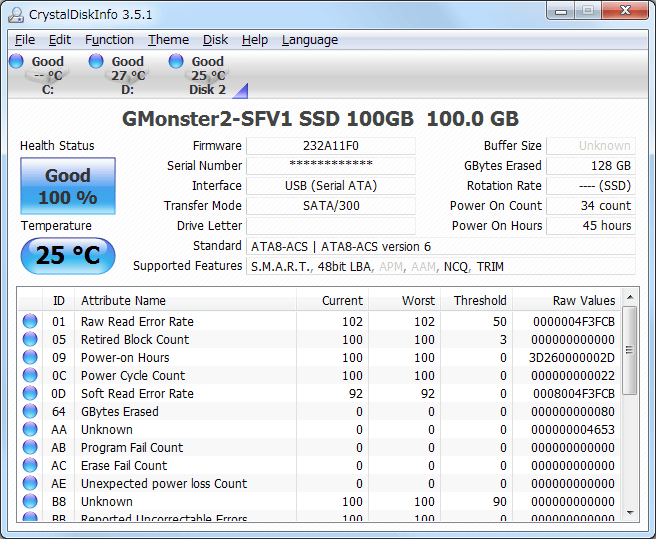
CrystalDiskInfo screenshot
CrystalDiskInfoFile & Disk ManagementWindows 11, Windows Server 2022, Windows Server 2019, Windows Server 2016, Windows 10 32/64 bit, Windows Server 2012, Windows 2008 32/64 bit, Windows 2003, Windows 8 32/64 bit, Windows 7 32/64 bit, Windows Vista, Windows XP 32/64 bit

User Rating: 1.3 (7 votes)

CrystalDiskInfo Awards

Windows 10 download editor's pick

CrystalDiskInfo for Windows 10 - Full description

CrystalDiskInfo is an open-source utility for checking the health and operating status of hard disk drives and solid-state drives. It reads S.M.A.R.T. data, the self-monitoring information reported by storage devices, and presents it in a desktop interface. Home users can use it for routine checks, while technicians can consult drive attributes when investigating storage problems or reviewing a system's condition.

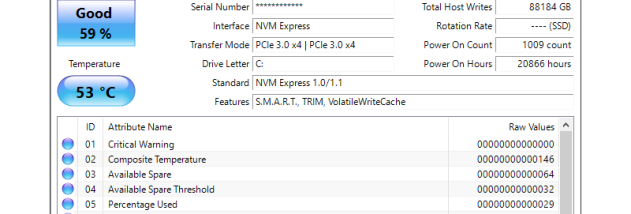
The program displays drive temperature and S.M.A.R.T. attributes such as read/write error rates and spin-up time. These values can help identify unusual readings and follow changes in a drive's reported condition. CrystalDiskInfo supports HDDs, SSDs and external USB storage, so users can review internal and connected drives from the same utility, provided the device and connection expose the relevant data.

Monitoring can run in the background, with configurable intervals and alerts when selected values pass set thresholds. This makes it possible to notice warning signs during normal computer use rather than checking each drive manually. Graphs and logs provide a record of readings over time, which can help when comparing changes or looking into intermittent issues. The information is useful for planning a backup or further diagnosis, but monitoring cannot prevent a hardware failure or replace a backup of important files.

Users can adjust interface themes and language settings to suit their preferences. The utility is designed to be lightweight, making it practical for regular monitoring without dedicating a full system-management suite to the task. Its straightforward presentation serves casual users who want a quick status check, while its detailed attributes and history offer more context for experienced users troubleshooting storage devices.

CrystalDiskInfo is free and open source, and runs on Windows. Supported systems include Windows 10 and 11, as well as several earlier Windows desktop releases and Windows Server editions. The readings available depend on the drive and how it is connected; some USB enclosures or storage controllers may not pass through all S.M.A.R.T. information. It reports drive health data rather than repairing disks or recovering files, so important data should be backed up independently.

CrystalDiskInfo for Windows 10 - Post your review