PDF Security Remover
... to your one-stop destination for the "PDF Security Remover" software, an innovative tool developed by the experts at PDF Security Remover. This Windows 10 compatible software is a game-changer ...

Diacritics Remover is a Windows utility that removes diacritics from selected file and folder names. It is useful when preparing files for upload to servers or other systems that do not handle accented characters reliably. The tool focuses on renaming, not changing file contents. It may fail when the resulting name already exists, and it does not remove characters unsupported by Microsoft SharePoint. Freeware with source code included.
| Author: | Sourceforge |
| License: | Freeware |
| Price: | FREE |
| Released: | Jun 30, 2013 |
| File size: | 102 kB |
| Downloads: | 300 |
| Keywords: | filename character conversion, remover, text processing tool, Windows 10 compatibility, Diacritics Remover, remove diacritics from filenames, customize file name, diacritics, Sourceforge, rename files without accents, diacritics remover, remove, remove accents from filenames, remove diacritics, x64 software, remove diacritics from folders, Unicode support |
| Author URL: | https://sourceforge.net/ |

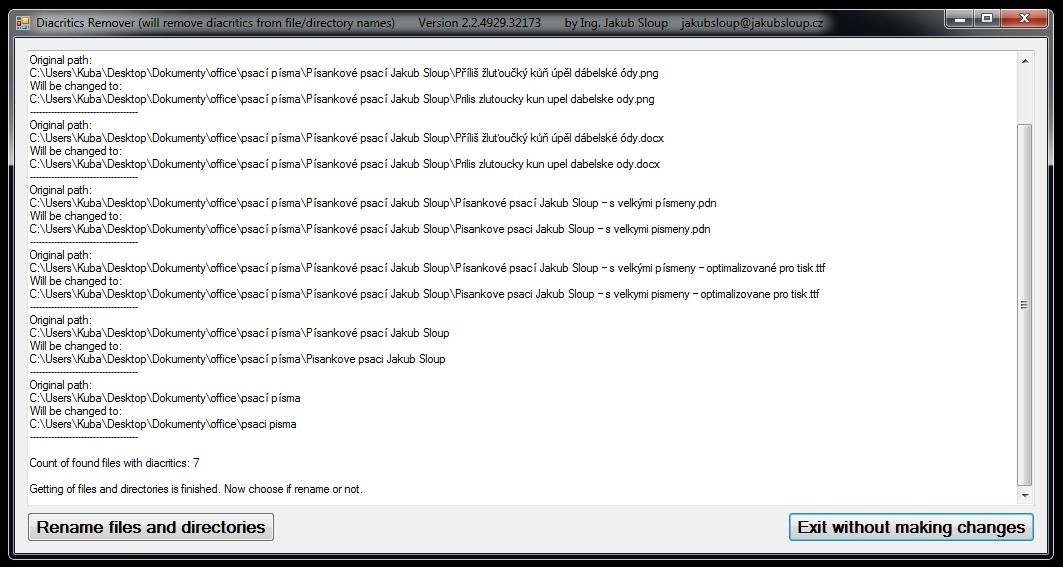

Diacritics Remover is a small Windows utility for changing file and folder names by removing diacritic marks. It is intended for people who need names to use plain characters, such as when preparing files for systems or servers that do not handle diacritics reliably. The program operates on selected files and folders rather than editing the contents of the files themselves.
Its main task is to process names in a selection and remove their diacritics. This can help make filenames more compatible with a destination that has limited character support. A user can apply the utility before uploading or transferring a group of files, avoiding the need to rename each item manually. The same approach applies to folder names when those names also need to use unaccented characters.
The utility is focused on this renaming workflow rather than broader file management. It does not remove every character that a destination service may reject: its known limitations include unsupported characters in Microsoft SharePoint. It also cannot rename a file when another file with the resulting name already exists. In that situation, the name needs to be changed to a distinct one before the conflict can be resolved.
Diacritics Remover may suit users preparing filenames for web hosting, file sharing, or other systems with restricted character handling. It is freeware, and its source code is included. The available system information lists Windows versions through Windows 10; it does not establish compatibility with later Windows releases.