DigitizeIt for Windows 10 - Full description
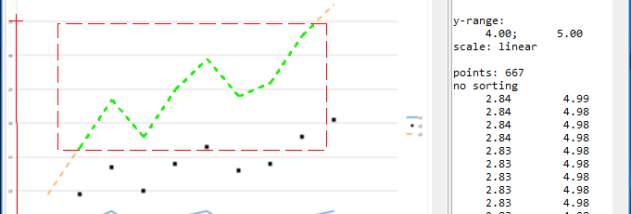
DigitizeIt is a graph digitization program for researchers, engineers and analysts who need to recover numerical data from charts saved as images. Instead of estimating plotted values by eye and entering them manually, users can open a graph image and capture its data points digitally. It is suited to work with published figures, scanned plots and other chart images where the underlying data is unavailable or needs to be transferred into an analysis workflow.
The program handles line graphs, scatter plots and bar charts. Users import image files in JPEG, PNG or TIFF format, then configure the graph and select the points or bars whose values they want to extract. Axis detection can help identify graph axes during setup, reducing manual preparation before digitizing. The resulting coordinates provide a structured representation of the visual data that can be used for further calculations or comparison with other datasets.
DigitizeIt also supports batch processing, which is useful when several charts need to be converted in one session. Rather than treating every graph as an isolated task, users can process multiple images and move their extracted values into other applications. Data can be exported in CSV, Excel or MATLAB formats, making it practical to continue analysis in spreadsheets, numerical tools or custom workflows without re-entering the measurements.
Typical uses include recovering values from scientific papers, converting legacy charts into editable data, and reusing plotted results for engineering or research analysis. Digitized points can support comparison, visualization and calculations, though the quality of the output depends on the source image and the accuracy of graph setup and point selection. Images with clear axes and legible marks are generally easier to work with than low-resolution or distorted scans.
DigitizeIt is trialware from Bormisoft and is available for Windows 10 and Windows 11, as well as several earlier Windows releases. It supports both 32-bit and 64-bit editions of Windows 10 and Windows 8, and both editions of Windows 7. The program's core workflow is image import, graph calibration, data extraction and export, allowing digitized values to move into the tools used for subsequent analysis.