DL Manage for Windows 10 - Full description
DL Manage is a command-line utility for administrators who need to change membership in Active Directory security groups and distribution lists. It can be used interactively from a command prompt or called from a batch file or script, making it suitable for recurring membership tasks as well as one-off changes. Its straightforward command syntax is intended to make group updates practical to include in existing administrative workflows.
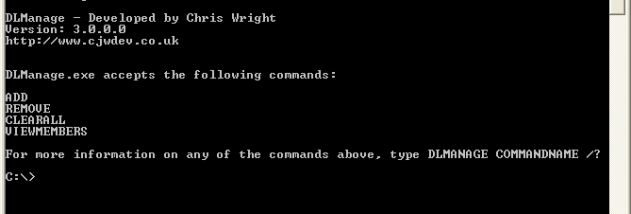
The utility can add selected users to a security group or distribution list, or remove selected users from one. These operations can be applied to multiple named groups in a single run, which helps when the same membership change is needed across several groups. DL Manage can also remove all users from a group, a broader operation useful when a list needs to be cleared before its membership is rebuilt. Administrators can view current group members to check membership before or after making changes.
For scheduled work, DL Manage can be placed in a batch file or script and run as part of an established process. Its log file records the result of executions, giving administrators a way to review what happened after an unattended task has run. This is particularly useful for recurring additions or removals, where checking a record can help confirm that each run completed as expected. The logging and member-viewing features complement the change commands without requiring a separate interface.
Typical uses include maintaining membership for security groups, updating distribution lists, and automating repetitive account administration. A script can carry out a planned set of membership changes, while the option to specify several groups can reduce the number of separate command invocations. Because the tool operates through the command line, it fits environments where administrative tasks are already managed with scripts rather than a graphical workflow. Care is appropriate when using the remove-all operation, since it affects every member of the selected group.
DL Manage is freeware from Cjwdev and requires Microsoft .NET Framework 2.0. It is a small command-line application rather than a graphical group-management console. The supplied platform information includes Windows 10 and earlier Windows releases; Windows 11 support is not stated. It is intended for Active Directory group membership changes, so its use depends on access to the relevant directory and permission to make the requested updates.