Easy System Utility
... One of our top picks is the "Easy System Utility" developed by ComputerSluggish. This powerful software is a must-have ... interface and a wide range of features, Easy System Utility makes it easy to clean up junk files, ...

DriverView is a NirSoft utility that lists device drivers currently loaded in Windows. Its table can show each driver's description, version, product name, creator company and load address. Users can copy selected entries to the clipboard, save them as text or HTML, or open an HTML report in a browser. It runs as a standalone executable without installation or extra DLLs.
| Author: | NirSoft |
| License: | Freeware |
| Price: | FREE |
| Released: | Jan 19, 2021 |
| File size: | 61 kB |
| Downloads: | 387 |
| Keywords: | driver inventory tool, device driver, driver lister, lister, export driver report, system utility, viewer, device driver information, driver, loaded driver list, driver viewer, driver management tool, NirSoft DriverView, Windows 10 compatibility, nirsoft driverview, x64 software, detailed driver information |
| Author URL: | https://www.nirsoft.net/ |
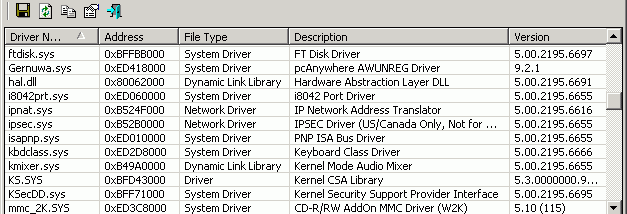

DriverView is a lightweight system utility from NirSoft for inspecting device drivers that are currently loaded in Windows. It is intended for users who need a quick inventory of active drivers, including technicians and administrators checking a system or documenting its configuration. Unlike a driver updater, it reports driver information rather than installing, removing, or updating drivers.
The main window presents loaded drivers in a table. For each entry, DriverView can show details such as the driver's description, version, product name, the company that created it, and its load address. This makes it possible to compare entries, identify the software associated with a driver, and review technical details without searching through separate system screens. The list covers drivers loaded at the time the utility is run; it is not a catalog of every driver package stored on the computer.
Driver details can be selected and copied to the clipboard, which is useful for pasting system information into support requests or notes. Selected entries can also be saved as text or HTML files. The HTML report can be opened in a browser, providing a readable way to review or share the collected information. These export options support both quick checks and keeping a record for later comparison, while leaving the underlying drivers unchanged.
DriverView runs as a standalone executable and does not require an installation process or additional DLL files. This makes it convenient for occasional troubleshooting or use from a portable toolkit. Its purpose is focused on viewing and exporting information, so it is best suited to inspection and documentation rather than driver maintenance. The utility is freeware and supports Windows versions including Windows 10.