Duplicate & Same Files Searcher
Duplicate & Same Files Searcher is a Windows utility for finding files that ... when their names or folder locations differ. It compares file contents byte by byte and also detects ...

Duplicate Files Search & Link finds duplicate files by comparing their contents byte by byte, as well as by name. Searches can target a drive or folder and use filters for file formats and size. Results include actions to open, exclude, delete, compress, or replace a file with a hard link. The program also displays NTFS hard links, symbolic links, and junction points, supports long paths, and can find identical media files even when their metadata differs.
| Author: | Yury Malich |
| License: | Freeware |
| Price: | FREE |
| Released: | Oct 5, 2026 |
| File size: | 5.40 MB |
| Downloads: | 24 |
| Keywords: | Duplicate Files Search & Link, symbolic link viewer, Duplicate, Duplicate Searcher, find duplicate files, duplicate file finder, Dupe Scanner, Search, Compare, compare file contents, download Duplicate Files Search & Link, Dupe, ntfs hard link manager, Duplicate Files Search & Link free download, remove duplicate files, Find Duplicate |
| Author URL: | http://malich.ru |


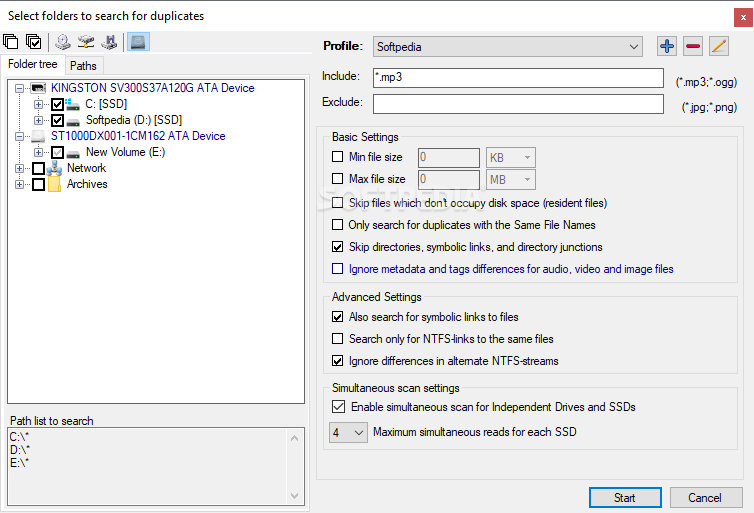
Duplicate Files Search & Link is a file-management utility for finding duplicate files and examining links on NTFS volumes. It suits users who want to reclaim storage, compare file collections, or understand where hard links, symbolic links, and junction points are used. Searches can target a whole drive or a chosen directory, with options to refine which files are scanned.
The program can identify duplicates by comparing file contents byte by byte, rather than relying only on matching names. Search rules can exclude selected formats and set minimum or maximum file sizes. Options to skip files or symbolic links, overlook metadata, and partially compare large files help adapt a scan to different collections and reduce unnecessary work. For SSDs, simultaneous reads can be enabled as part of the search settings.
After scanning, results appear in a preview panel with file details and a context menu for taking action on individual entries. Users can open a file, remove it from the results, delete it, compress it, or replace it with a hard link. This makes the tool useful not only for locating repeated data but also for deciding how to handle it. Its link views show hard links, symbolic links, and junction points, giving more experienced users a way to inspect relationships between files and folders.
Content-based comparison can also reveal identical audio, video, or image files whose metadata differs. That can help when copies have different descriptive information or filenames but contain the same data. Long paths exceeding the traditional 260-character limit are supported, which can be useful when scanning deeply nested folders or working with archives of organized project files.
The interface exposes a broad set of search and file-management controls, so it may take more exploration than a basic duplicate finder. Its core workflow remains direct: choose a drive or folder, set scanning rules, review the matches, and select an action. Duplicate Files Search & Link is freeware for Windows, including Windows 10 and Windows 11, and can also be used on supported Windows Server systems.