Howard Email Notifier
... your one-stop destination for downloading the exceptional "Howard Email Notifier" software, a product of the renowned "The SZ Development". This Windows 10 compatible software is a must-have tool for those ...

e-Campaign is a desktop tool for preparing and sending email campaigns to multiple contacts. It organizes work into named mailing jobs and lists with customizable fields and a designated email-address field. The message editor supports text formatting, HTML, attachments, images, links, tables and merge fields for personalized content. Users can preview and schedule jobs, maintain exclusion lists, manage email accounts and database connections, and export delivery or failure logs. It is offered as demo software for Windows.
| Author: | LMHSOFT.COM |
| License: | Demo |
| Price: | $199.95 |
| Released: | Oct 12, 2026 |
| File size: | 23.10 MB |
| Downloads: | 448 |
| Keywords: | mailing list manager, mailer, bulk email sender, e-mail, x64 software, create mailinglist, Windows 10, mailinglist, schedule email campaigns, email marketing tool, email delivery logs, email campaign software, sender, personalized email merge, e-Campaign, send mass message, LmhSoft, bulk mailer |
| Author URL: | https://www.lmhsoft.com/ |





e-Campaign is a desktop email campaign tool for organizations, businesses and individuals who need to send announcements or other messages to multiple contacts. It organizes work into named mailing jobs, each of which can use a mailing list with its own name, fields and designated email-address field. This structure helps keep separate campaigns and contact data manageable rather than composing every message as a one-off email.
Messages can be edited with basic text formatting, including font style and size, and prepared as HTML. The editor supports images and attachments, hyperlinks, tables, horizontal rules and inserted HTML code. Merge fields let a message include values from a contact record, such as a recipient-specific detail; conditional merge fields can make content depend on field values. Default values for merge fields can be set for records where information is missing, and images can be personalized as part of a message.
Before sending, users can preview a mailing job, revise text with undo and search-and-replace tools, or export message content to an HTML file. Jobs can be duplicated when a similar campaign is needed, while exclusion lists help omit selected addresses from a mailing. The application also provides mass-mail mode, settings for the sender name and email address, and options for choosing a default font for HTML messages. An external editor can be configured for users who prefer another writing tool.
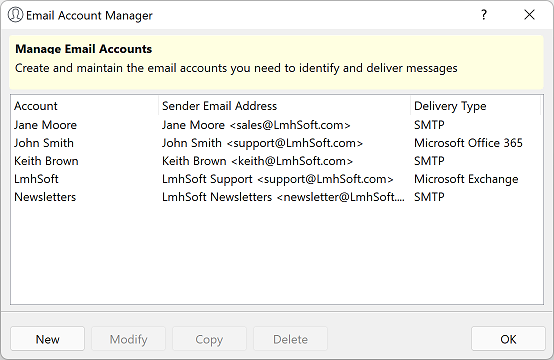
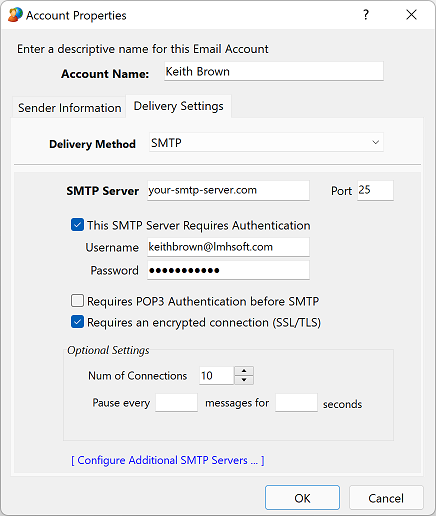
Campaign work can be scheduled, and email accounts, mailing lists and database connections can be managed within the program. Delivery and failure logs can be exported to review sent messages and addresses that could not be reached. These tools suit recurring notices, event announcements and other bulk correspondence where message personalization, contact lists and delivery records are useful. A help file with tutorials and screenshots is available to assist new users.
e-Campaign is offered as demo software and is intended for Windows. Supported systems include Windows 10 and 11, as well as several Windows Server releases and earlier desktop Windows editions. The program can open a webpage in its built-in workflow and export HTML content, making it useful for preparing formatted email campaigns alongside list and account management.