Mp3 Tag Tools
Mp3 Tag Tools is an open-source utility for editing ID3 metadata and organizing MP3 collections. It is ... program works with ID3v1.1 and ID3v2.x, and can edit tracks individually or in batches. Tag fields can be ...

EasyTAG is an open-source editor for viewing and changing metadata in MP3, FLAC, Ogg, MP4/AAC, MusePack, Monkey's Audio and WavPack files. It edits fields such as title, artist, album, track number, date and artwork. Filename masks can fill tags or rename files, and batch operations can include subfolders. CDDB lookup and file-header details support music library organization.
| Author: | Jerome Couderc |
| License: | Open Source |
| Price: | FREE |
| Released: | Dec 21, 2016 |
| File size: | 21.60 MB |
| Downloads: | 545 |
| Keywords: | edit music metadata, Jerome Couderc, GNOME application, audio tag editor, MP3 tag, ID3 tag editor, mp3 tag editor, EasyTag, rename music files, Easy Tag, tagger, editor, Windows 10, batch audio tagging, audio tagging, edit ID3 tag, id3 tag editor, edit, x64 software |
| Author URL: | http://easytag.sourceforge.net/ |
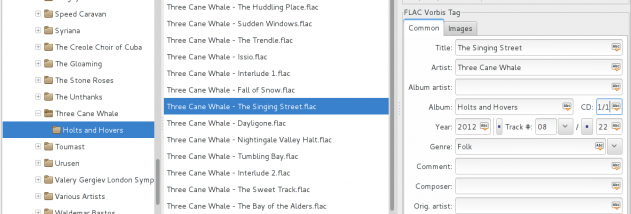



EasyTAG is an open-source audio tag editor for organizing music collections. It lets users inspect and update metadata embedded in audio files, including titles, artists, albums, track and disc numbers, dates, comments, composers, copyright details, URLs and encoder names. It is suited to listeners who want consistent tags across a library, as well as users preparing files for media players that rely on accurate metadata.
The program handles MP3 and MP2 ID3 tags, including attached pictures, and metadata in FLAC, Ogg Vorbis, Opus and Speex, MP4/AAC, MusePack, Monkey's Audio and WavPack files. Users can select files from a directory, browse its subdirectories and edit individual entries or apply a shared field value across selected tracks. EasyTAG also reads audio header information such as bitrate and duration, making it possible to check file details while reviewing a collection.
For repetitive work, filename and folder masks can fill tag fields automatically, while tag-based masks can rename files and directories. These tools help standardize naming and metadata together, rather than handling each file separately. Operations can be applied recursively to subfolders for tagging, saving, removing tags or renaming. The editor can also transform text between uppercase, lowercase and other letter-case formats, complete a date from a partial entry, and undo or redo recent changes.
EasyTAG includes manual and automatic CDDB lookups through the Freedb.org and Gnudb.org servers to help retrieve track information. A tree browser and an artist-and-album view offer different ways to navigate a collection; a file list supports selection, while separate windows provide file searching and playlist generation. Files or folders can also be opened in an external application, allowing the tag editor to fit into a broader music-management workflow.
The interface is available in multiple languages, and the software is written in C with a GTK+ graphical interface. EasyTAG is free and open source, with builds for Windows as well as packages for Linux. The Windows compatibility information includes Windows 10; requirements may vary by build. It focuses on editing and organizing audio metadata rather than playing music.