Epubor ZinioUnlimited Mate
Unlock a world of digital reading with Epubor ZinioUnlimited Mate, the ultimate software for Zinio users. Developed by Epubor, this powerful tool allows you to effortlessly download ...

Epubor Tidal Downloader is a Windows utility for saving Tidal tracks, albums and playlists as audio files for offline playback. It supports MP3, AAC, FLAC and WAV, offers batch downloading, and retains details such as artist, album and track number to help keep a local music library organized. It is demo software for 64-bit Windows 10 and Windows 11.
| Author: | Epubor |
| License: | Demo |
| Price: | $12.99 |
| Released: | Nov 13, 2025 |
| File size: | 65.00 MB |
| Downloads: | 160 |
| Keywords: | tidal to flac, Epubor Tidal Downloader, Epubor Tidal Downloader free download, download tidal playlists, DRM removal, software, playlist, Tidal downloader, Epubor, tidal music downloader, download, Tidal, tidal to mp3, downloader, user-friendly interface, ebook, offline music downloader, audio downloader, Downloader, music downloader, download Epubor Tidal Downloader, Tidal music converter, music downloading software, high-quality audio |
| Author URL: | https://secure.avangate.com/affiliate.php?ACCOUNT=EPUBORVR&AFFILIATE=758&PATH=http%3A%2F%2Fwww.epubo |
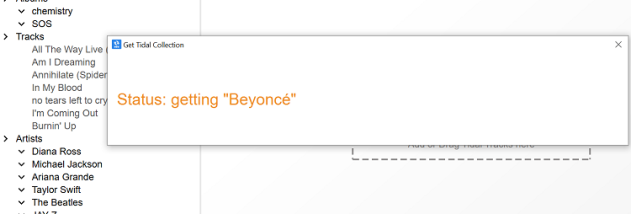


Epubor Tidal Downloader is a Windows application for saving music from Tidal as audio files for offline playback. It is intended for listeners who want to keep selected tracks, albums or playlists available when an internet connection is unavailable, and for people who prefer managing music in a local library. The software provides a graphical workflow for choosing content and converting it into common audio formats.
Users can select individual tracks, complete albums or playlists to download. Batch downloading handles multiple selections in one session, which can be useful when preparing a larger collection rather than processing songs one at a time. After choosing content, users can select an output format: MP3 and AAC are widely supported by portable players and media apps, while FLAC and WAV are options for workflows that use lossless or uncompressed audio. The supplied feature information says the program aims to retain the original audio quality, though the result can depend on the source and selected format.
The downloader also retains music details such as artist, album and track number. These tags help keep files identifiable in a media player and make larger libraries easier to browse and sort. Combining metadata retention with batch processing reduces the amount of manual organization needed after saving a set of tracks. The interface is presented as straightforward, with content selection and format choice forming the main steps of the workflow.
Typical uses include preparing music for listening during travel, keeping selected albums accessible without a live connection, or organizing chosen tracks in a local audio collection. The available format choices make the files suitable for different playback and storage preferences, while batch downloads can simplify handling playlists or multiple albums. Users should ensure that their use of downloaded music complies with applicable copyright rules and Tidal's terms.
Epubor Tidal Downloader is offered as demo software and is intended for 64-bit editions of Windows 10 and Windows 11. It focuses on Tidal music conversion and downloading rather than general-purpose audio editing or library playback. Check the demo's available functions and any applicable usage conditions before relying on it for a large download or ongoing collection workflow.