EventGhost for Windows 10 - Full description
EventGhost is an open-source automation tool for Windows that connects events from applications and devices to actions on the computer. It is suited to people who want to automate recurring tasks, coordinate connected equipment or build custom remote-control and smart-home workflows. Instead of requiring each action to be started manually, EventGhost listens for configured triggers and runs the responses attached to them.
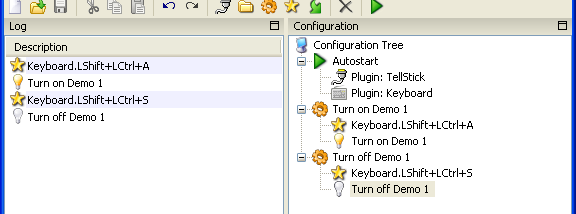
Its event-driven setup can respond to inputs such as keyboard activity, mouse movements and signals from compatible connected devices. Users can pair an event with one or more actions, then arrange actions into sequences to create a workflow. For example, a trigger from a remote control or receiver can be used to start an action in an integrated application. The event-and-action approach also helps make repetitive computer tasks consistent, since the same configured response can run whenever its trigger occurs.
Plugins extend the program's connections to software and hardware. They can integrate with applications such as media players, web browsers and office suites, as well as equipment including infrared receivers, remote controls and smart-home devices. The available integrations make it possible to use EventGhost as a central point for workflows involving more than one device or application. The precise options depend on the plugins and equipment in a particular setup.
The graphical interface organizes automation into events and actions, with drag-and-drop controls for assembling and managing sequences. Users can test configurations as they work, which helps identify whether a trigger and its responses behave as intended before relying on the workflow. For more specialized routines, Python scripting provides a way to add custom logic and manipulate data beyond the standard visual setup. This gives experienced users more control while keeping basic event-action automations accessible without writing scripts.
EventGhost can be used for media-center control, device integration, smart-home routines and other repetitive Windows tasks. It runs on Windows 10 and Windows 11, including 32-bit and 64-bit systems, and is distributed as open-source software at no cost. Its plugin-based design is most useful when the required application or hardware has a compatible integration; checking that compatibility is an important part of planning a setup. The program is intended for Windows rather than as a general-purpose automation service for other operating systems.