EZ File Transplanter
Welcome to the download page for EZ File Transplanter, an exceptional software developed by Super Win ... tool revolutionizes the way you manage and transfer files. With its user-friendly interface and powerful features, EZ ...

FastFolders adds folder browsing to the Windows Explorer context menu, letting users navigate nested directories through cascading menus instead of opening multiple windows. It also displays file and folder sizes to help assess storage use. Context-menu appearance, file-type actions and shortcuts can be customized, making the utility useful for frequent file access and routine folder management.
| Author: | DeskSoft |
| License: | Trialware |
| Price: | $15.00 |
| Released: | Oct 25, 2025 |
| File size: | 1.30 MB |
| Downloads: | 316 |
| Keywords: | quick directory access, explorer, Windows 10 software, menu, folder shortcut tool, directory, shell, cascading folder menu, tree, file management utility, FastFolders, context, browser, size, file and folder size display, file navigation enhancement, x64 application, folder navigation utility, windows explorer context menu, DeskSoft, folder, file |
| Author URL: | https://www.desksoft.com/TypeButler.htm |
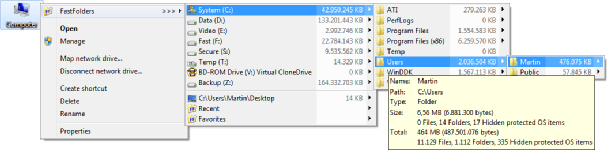



FastFolders is a file-navigation utility from DeskSoft for people who regularly work with folders in Windows Explorer. It adds browsing tools to Explorer's context menu, making it possible to reach folders and files through a cascading menu rather than opening a series of windows. This approach is useful when frequently used locations sit several levels down a directory tree or when moving between folders interrupts other work.
The cascading folder menu presents directory contents in nested menus. Users can browse into subfolders from the context menu and continue through the tree until they reach the location they need. This gives a quick overview of a folder's structure and reduces the back-and-forth involved in navigating deeply nested directories. It can be used wherever Explorer's context menu is available, keeping file access close to the normal Windows file-management workflow.
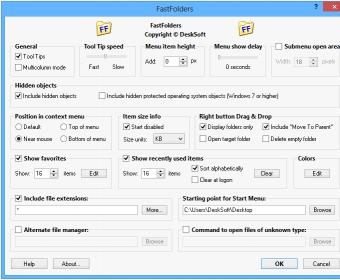
FastFolders also provides information about file and folder sizes, helping users assess how storage is distributed without relying solely on a separate disk-usage tool. The size display can help identify large items when reviewing a directory or deciding what to archive or remove. Customization options let users adjust the context menu's appearance, assign actions to different file types and define shortcuts for faster access. These settings allow the menu and its behavior to better match recurring tasks and personal preferences.
The utility is suited to everyday folder browsing as well as work involving large collections of documents, project files or other data stored across multiple directory levels. Someone who repeatedly opens the same nested locations can use the menu to shorten navigation, while size information can support routine storage checks. The Explorer integration keeps these tasks within the file manager rather than requiring a separate browsing interface.
FastFolders is trialware and is intended for Windows systems, including Windows 10 and Windows 11, as well as several Windows Server releases. It is a small utility focused on context-menu access and folder navigation; its functions are most relevant to users who manage files through Windows Explorer. The published system support also includes older Windows desktop and server editions.