FileAccessErrorView for Windows 10 - Full description
FileAccessErrorView is a lightweight Windows utility for identifying file access failures. It is intended for developers, system administrators and advanced users investigating why an application cannot open or work with a particular file. Rather than requiring users to reproduce a problem while watching an application's own messages, it records file access errors as they occur and presents them in a single-window list for inspection.
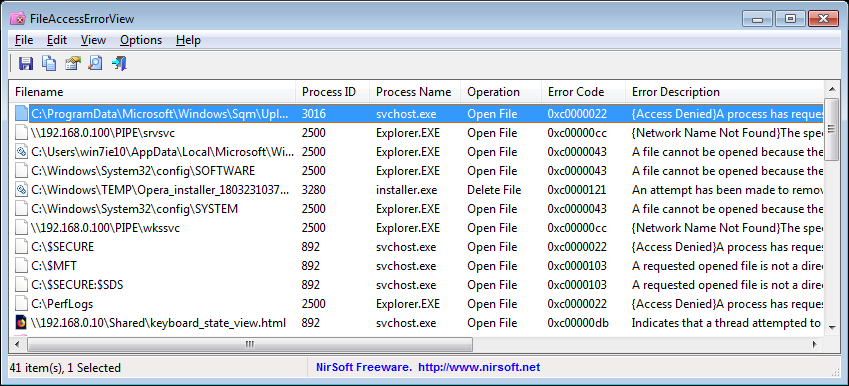
When launched, the utility begins monitoring and captures errors generated by applications attempting to access files. This helps connect a failure to the process responsible for it, which can be difficult to determine when several programs are running. For example, an Access Denied error can be reviewed alongside the file involved and the application that attempted the operation, giving the person troubleshooting the issue a more concrete starting point than a generic failure message.
Each entry includes the file name, the process that made the access attempt, an error code and a textual description of the error. These details help distinguish between separate failures and narrow an investigation to a particular file or process. A user can review the list to identify which application encountered the problem and what kind of error Windows reported, then investigate likely causes such as file permissions or other access restrictions. The utility reports the errors; it does not itself change permissions or repair the affected application.
The single-window interface keeps captured events together for direct review, making the tool useful during application debugging, support work and routine Windows troubleshooting. Developers can use it to investigate failed file operations, while administrators can examine access problems on systems they manage. It can also help advanced users understand why a program reports that a file is unavailable, especially when the visible message does not identify the process or underlying error clearly.
FileAccessErrorView is freeware and portable, so it can run without installation and be carried on removable storage for troubleshooting different computers. Its small footprint is suited to keeping it available as a focused diagnostic utility rather than a general-purpose monitoring suite. It supports Windows 10 and Windows 11, as well as Windows 8, Windows 7 and Windows Vista in 32-bit and 64-bit editions. The program is designed to monitor and display errors with limited impact on system resources; its purpose is to provide diagnostic information for follow-up investigation.