HDR Darkroom x64
HDR Darkroom x64 is a high dynamic range photo editor ... make this process approachable for people new to HDR as well as useful for established photography workflows. The ...

HDR Darkroom is an HDR image editor for photographers working with scenes that contain both deep shadows and bright highlights. It combines three bracketed photos - a normal, overexposed and underexposed frame - into one image with a wider range of visible detail. Local Tone Mapping compresses that range for display, aiming for photo-realistic results without distracting halos. Its approachable controls suit newcomers to HDR photography.
| Author: | Everimaging Ltd. |
| License: | Demo |
| Price: | $89.00 |
| Released: | Sep 7, 2015 |
| File size: | 50.90 MB |
| Downloads: | 319 |
| Keywords: | hdr photo editor, high dynamic range imaging, HDR Composition, high dynamic range, editor, photo editing software, image processing, Everimaging Ltd, RAW, HDR, HDR photography, local tone mapping, hdr image software, raw photo converter, Windows 10 compatible, RAW converter, merge bracketed photos, digital image editor |
| Author URL: | http://www.hdrdarkroom.com/ |
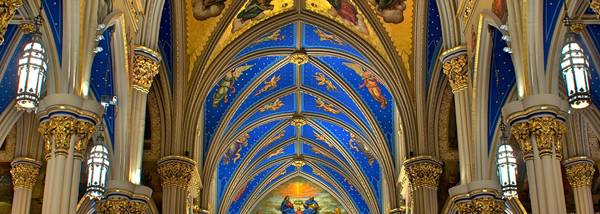

HDR Darkroom is a high dynamic range image editor for photographers who want to recover detail from scenes with very bright highlights and deep shadows. It combines multiple exposures of the same scene into one image, using the extra tonal information to represent details that a single exposure may lose. Its straightforward controls make the process accessible to people starting with HDR photography as well as those refining a photo workflow.
The core workflow uses three bracketed photographs: a normally exposed frame, an overexposed frame and an underexposed frame. HDR Darkroom merges their image information into a composite with a broader range of visible detail. The brighter frame can contribute information from shadowed areas, while the darker frame preserves detail in highlights; the normal exposure supplies a middle reference. The result is intended to retain detail across the scene rather than leaving areas uniformly dark or washed out.
After merging, Local Tone Mapping is used to compress the extended tonal range into an image that can be viewed on a standard display. This process helps make details from both bright and dark regions visible at once. The software is designed to produce photo-realistic results, with the goal of avoiding distracting halos and other blemishes that can appear in HDR images. Its controls are intended to let users adjust the result without relying on a long sequence of manual image-editing techniques.
The program is suited to landscapes, architecture and other scenes where the visible brightness range exceeds what one exposure can capture. It can also help when a photo looks noticeably different from the scene as seen by eye, such as a view with a bright sky above a shaded foreground. For best results, the source frames should depict the same composition at different exposure levels, so the merged image can draw on complementary detail from each photograph.
HDR Darkroom is commercial software offered as a demo. It is an image editor with HDR composition and RAW-conversion capabilities. Its stated Windows support includes Windows XP, Vista, 7, 8 and 10; Windows 11 support is not established. The software is intended for photographers who want a dedicated tool for combining bracketed exposures and adjusting the resulting HDR image.