Moo0 RightClicker PRO
... newly created menu tree folder. Users can also change menu icons to make entries easier to distinguish. Default Windows context-menu items can be restored through ...

HotKey Resolution Changer is a lightweight Windows utility for switching between screen resolutions with keyboard shortcuts. It supports two to nine configurable hotkeys, runs in the system tray and can start minimized. Users can assign a shortcut to each resolution and change display settings with a keypress, avoiding repeated trips through Windows display settings. It is useful for multi-monitor setups and other workflows that call for frequent resolution changes. The freeware is distributed under the Creative Commons Attribution-NonCommercial-ShareAlike 3.0 license.
| Author: | Karsten Funk |
| License: | Freeware |
| Price: | FREE |
| Released: | May 26, 2012 |
| File size: | 481 kB |
| Downloads: | 559 |
| Keywords: | Resolution Switcher, windows display resolution, custom resolution hotkeys, multi monitor resolution tool, Display Settings, hotkey resolution changer, Karsten Funk, Windows 10 Utility, Resolution Changer, resolution switcher, Change Resolution, Resolution, Change, Changer, change screen resolution, HotKey Resolution Changer, Shortcut Key Functionality, Screen Resolution |
| Author URL: | https://funk.eu/ |
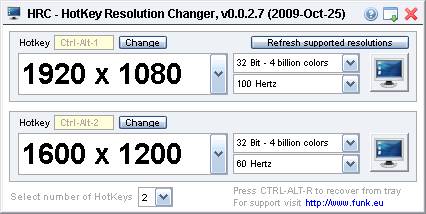

HotKey Resolution Changer is a lightweight Windows utility for switching between screen resolutions with keyboard shortcuts. It is intended for people who regularly change display settings, including users of multi-monitor setups who want to avoid opening display settings and choosing a resolution each time.
The program lets users configure between two and nine resolution shortcuts. Each shortcut can be assigned a custom hotkey, so a saved resolution can be selected with a keypress. This is useful when moving between tasks that work better at different screen sizes, or when a display arrangement changes and a quick switch is preferable to manual adjustment.
HotKey Resolution Changer runs quietly in the system tray and can start minimized. Adding a shortcut to the Windows Startup folder allows it to launch when Windows starts, leaving the resolution controls available in the background without requiring an open desktop window. Its role is focused on switching resolutions rather than managing broader display settings.
The software is freeware under the Creative Commons Attribution-NonCommercial-ShareAlike 3.0 license. That license permits sharing and adaptation under its attribution, noncommercial-use and share-alike conditions. The supplied operating-system compatibility covers Windows XP through Windows 10, including listed 64-bit editions; Windows 11 compatibility is not established here. The download is small, at 481 KB.