Metasequoia
Discover the world of 3D modeling with Metasequoia, a powerful and intuitive software developed by O. Mizno, designed specifically for Windows 10 users. Whether you’re ...

IP Video System Design Tool helps surveillance professionals plan IP camera installations using site layouts, camera placement, and field-of-view simulation. It supports camera models from multiple brands and calculates estimated bandwidth and storage from settings such as resolution, frame rate, and compression. Reports collect camera specifications and design calculations.
| Author: | Joint Video Surveillance Group |
| License: | Trialware |
| Price: | $350.00 |
| Released: | Oct 1, 2026 |
| File size: | 471.00 MB |
| Downloads: | 683 |
| Keywords: | IP video system, video surveillance, IP video, Bandwidth and storage calculation, video system designer, video surveillance system, ip camera bandwidth calculator, camera field of view planner, 3D modeling, IP Video System Design, CCTV design software, Joint Video Surveillance Group, Video surveillance optimization, surveillance storage calculator, ip video system design, surveillance camera layout, video surveillance design software |
| Author URL: | https://www.jvsg.com/ |

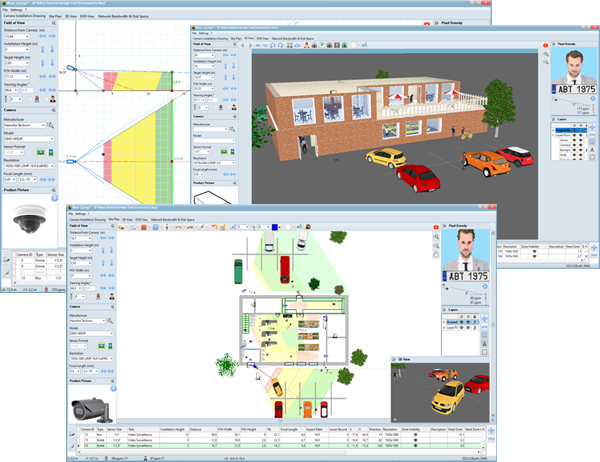



IP Video System Design Tool is a planning application for professionals who design IP video surveillance and security systems. It helps turn a site layout into a camera plan, bringing camera selection, viewing coverage, and infrastructure estimates into one project. Designers can use it to assess how a proposed system will cover a space before installation, whether they are preparing a new deployment or documenting a design for a client.
The layout tools let users place cameras and other system components in a representation of the surveillance environment. Camera models from multiple brands are supported, giving designers options when planning around project requirements. Field-of-view simulation shows the area covered by each camera, helping with placement decisions and revealing potential blind spots. This makes it easier to compare positions and adjust a layout to improve coverage across rooms or larger sites.
The tool also estimates network bandwidth and storage needs. Designers enter parameters such as video resolution, frame rate, and compression type to calculate the resources a system may require. These estimates help inform network and storage planning before equipment is deployed, and can highlight whether the proposed infrastructure is likely to support the camera configuration. Three-dimensional modeling adds a spatial view of the environment, complementing the layout and coverage planning.
Reports and project documentation can bring together camera specifications, coverage diagrams, and bandwidth and storage calculations. This material supports design reviews and client presentations, and can provide a reference for later maintenance. The drag-and-drop workflow is intended to make it practical to position components and revise a plan without building every change from scratch. The application is suited to security system designers, surveillance integrators, and others responsible for specifying or reviewing IP camera installations.
IP Video System Design Tool is trialware for Windows. It supports Windows 10 and Windows 11, as well as Windows 7 and Windows 8 in 32-bit and 64-bit editions. Its planning and calculation functions are focused on IP video surveillance design; the program is used to model and document a system rather than operate cameras as a live monitoring console.