Mac & Boot Camp Fan Control for Windows 10 - Full description
Mac & Boot Camp Fan Control is a Windows utility for monitoring temperatures and managing fan speeds on Mac computers running Windows through Boot Camp. It is intended for Mac owners who want more visibility and control over cooling while using Windows, including when demanding work or personal tasks put extra load on the system.
The interface displays current fan speeds alongside temperature readings from available system sensors and system status. This information helps users see how the computer is responding to its workload before changing cooling settings. Fan speeds can be adjusted in real time, either by entering custom RPM values or selecting from predefined settings. Manual adjustment lets users choose a preferred balance between cooling and fan noise, while sensor readings provide context for those decisions.
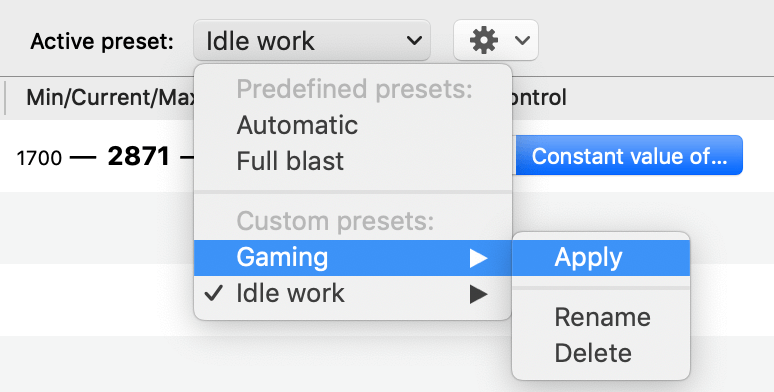
For more tailored setups, the utility supports custom fan presets and automatic switching based on specified conditions. Presets can be used to keep different cooling configurations for different needs, rather than repeatedly setting fan speeds by hand. Automatic switching can apply a suitable configuration when its chosen conditions are met. The central interface brings these controls and monitoring information together, so users can check the system and make adjustments without relying on separate monitoring and fan-control tools.
Typical uses include managing cooling during gaming, video editing, software development, or other resource-intensive activity, as well as reducing fan noise during lighter workloads. It can also help users who move between macOS and Windows keep track of temperatures and fan behavior while working in Boot Camp. The tool is focused on Mac hardware rather than general-purpose Windows PC fan control.
Mac & Boot Camp Fan Control is shareware from CrystalIDEA Software. The Windows release supports Windows 11, Windows 10, Windows 8, and Windows 7, with 32-bit and 64-bit editions specified for Windows 10, 8, and 7. Its controls are most relevant on compatible Mac systems with accessible fan and temperature sensors; available readings and fan options can depend on the hardware. Users should make changes with thermal conditions in mind, since fan settings affect how the computer cools under load.