Asus Fan Control for Windows 10 - Full description
Asus Fan Control is an open-source utility by Karmel0x for adjusting and monitoring cooling fans on supported Asus laptops. It is intended for users who want to manage the balance between cooling and fan noise, whether they are working, gaming or using demanding applications. Rather than relying only on a single fixed fan setting, users can adjust fan speed to suit different workloads and preferences.
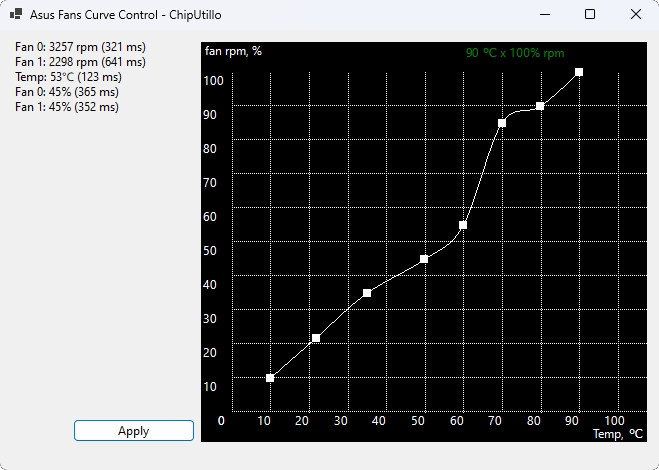
The program provides controls for changing fan speed and displays current fan speeds and system temperatures. These readings help users check how the laptop responds to a workload and whether its cooling behavior matches their needs. For example, a user can monitor temperatures during a demanding task and adjust fan settings when more cooling is desired. The available control depends on compatibility with the laptop's hardware, so support should be confirmed for the particular Asus model.
Custom fan profiles let users save settings for different situations and switch between them as needed. A quieter profile can suit everyday work or media use, while a more cooling-focused configuration may be useful during gaming or other intensive activity. Keeping separate settings avoids having to recreate adjustments whenever use of the laptop changes. The interface brings fan controls and thermal readings together for this tuning process.
This kind of utility is most relevant to Asus laptop owners who want more direct control over cooling than their usual system settings provide. It can help users choose a preferred noise and cooling balance and observe the thermal effect of their changes. Fan speed adjustments do not replace good ventilation or remove the need to keep vents clear; they are a way to manage the laptop's cooling behavior within the controls available to the software.
Asus Fan Control is free and open source, and it is intended for 64-bit editions of Windows 10 and Windows 11. Because fan-control access varies among laptop models, the program may not work with every Asus laptop. Users should check model compatibility before relying on it and use temperature readings to assess the results of any changes.