System Information Viewer
Welcome to the home of System Information Viewer, an ingenious piece of software developed by the renowned Ray Hinchliffe. This Windows 10 compatible tool is a veritable treasure trove of system ...

Magical Jelly Bean Keyfinder retrieves Windows product keys from the system registry and can recover keys from an installation that will not boot by loading its registry hive. It can also find keys for other applications through a community-maintained configuration file. Results can be saved as text or CSV, printed, or handled with command-line options.
| Author: | Sourceforge |
| License: | Freeware |
| Price: | FREE |
| Released: | Feb 16, 2022 |
| File size: | 922 kB |
| Downloads: | 233 |
| Keywords: | offline registry key recovery, finder, find product key, user-friendly interface, view windows key, Windows 10 compatible, software product key viewer, find, windows product key finder, viewer, product key retrieval, recover windows key, Sourceforge software, save product keys csv, x64 application, Magical Jelly Bean Keyfinder, retrieve product key, retrieve application keys |
| Author URL: | https://sourceforge.net/ |
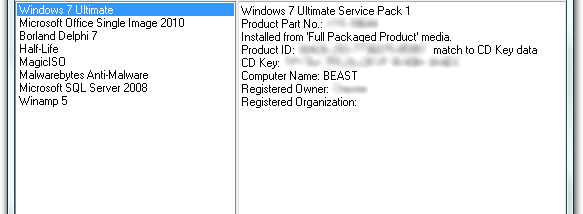

Magical Jelly Bean Keyfinder is a freeware utility for recovering Windows product keys stored in the system registry. It is useful when an installer, repair, or reinstall requires a key that is no longer readily available. The program can also look up keys for other applications through a configuration file maintained by its community, making it a practical option for people organizing software licenses on a Windows computer.
The main window retrieves the Windows key from the registry of the running installation and displays it for reference. For a Windows installation that will not boot, the Load Hive feature reads the registry hive from its drive. The drive can be connected to a working Windows machine, where the user selects the offline installation in Keyfinder. This makes it possible to recover a key without starting the damaged copy of Windows, provided its registry files can be accessed.
Keyfinder can save or print the keys it finds, including keys for supported applications. Saved results can be written as plain text or CSV, which is useful for keeping a readable record or opening the data in a spreadsheet. Command-line options support saving results, exporting CSV, closing the program, displaying help, and specifying a registry hive or file. These options allow basic tasks to be run without using the main window and can help incorporate key retrieval into a manual support workflow.
Typical uses include recording a Windows key before replacing a drive, checking license details during troubleshooting, and retrieving a key from an offline Windows installation. Results for other programs depend on the available configuration entries, so the utility should not be treated as a complete license inventory for every installed application. Its focus is key retrieval and saving or printing the results rather than managing licenses or installing software.
Magical Jelly Bean Keyfinder is freeware and supports Windows versions including Windows 10 and Windows 11, as well as several earlier Windows releases. Loading a hive from another installation requires access to its drive and registry files; administrative rights may be needed, particularly on Vista. The utility is intended for Windows systems and does not require the offline installation itself to start when its hive can be read from a working environment.