Money Manager Ex Portable x64 for Windows 10 - Full description
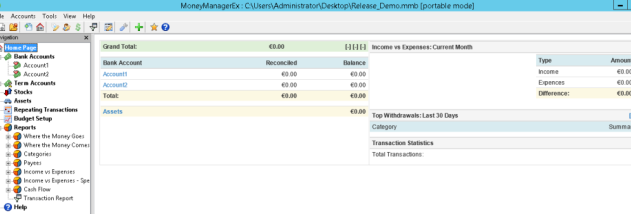
Money Manager Ex is an open-source personal finance application for people who want to record transactions, organize accounts and understand how their money moves. Its account-based layout brings everyday banking, credit, loans, investments and assets into one place, with summary views for reviewing balances and overall finances.
The program supports multiple checking, savings, credit card, loan, stock investment and asset accounts. Income and expense entries can be assigned to custom categories and payees, while transfers record money moving between accounts. Transactions can be marked reconciled, unreconciled or void, which helps compare records with bank statements. For investments, users can track shares, bonds and mutual funds, update share prices and review gains or losses. Multiple currencies are supported across accounts.
Budgets can be set for a calendar year and reviewed over time. Reports present spending by category or payee, show a selected category across a date range, compare income with expenses and indicate how spending relates to a budget. An account tree provides navigation to individual accounts and summaries, including upcoming bills and deposits. Scheduled bills and deposits can be entered as reminders, helping users keep expected payments and income in view. Accounts can also be closed or marked as favorites.
For moving financial records between applications, Money Manager Ex imports CSV data and QIF files used by Microsoft Money and Quicken. Account data can be exported to CSV, and reports or account information can be printed with a print preview. Unicode support covers stored data, and currency formatting is internationalized. These tools make the program useful for household budgeting, tracking bank activity, monitoring investments and producing a record of spending for review.
Money Manager Ex is free and open source, and runs on Windows, Linux and macOS. This portable x64 edition is intended for 64-bit Windows systems, including Windows 10 and Windows 11. Its features are suited to users who want a hands-on ledger and reporting tool for personal finances rather than an automated banking service.