DP Animation Maker
Welcome to the home of DP Animation Maker, a cutting-edge software developed by the renowned ... amateurs and professionals who wish to create stunning animations with ease. DP Animation Maker is a Windows ...

MotionGIF combines drawing, painting, image editing and frame-based animation for creating animated GIFs, particularly for web use. Users can drag in images, add vector drawing objects and apply transitions such as fades and dissolves. It also supports transparency, adjustable opacity, shared backgrounds across frames and a reusable object library.
| Author: | Wisdom Software Inc. |
| License: | Trialware |
| Price: | $19.95 |
| Released: | Feb 19, 2017 |
| File size: | 7.00 MB |
| Downloads: | 262 |
| Keywords: | transparent gif creator, user-friendly interface, Animation Creator, Wisdom Software Inc., animated gif maker, Animation, gif animation editor, Create Animation, MotionGIF, GIF animation, Animate, Transition, gif transition effects, animated web graphics, high-quality output, frame-by-frame editing, create gif animation, Animate Frame |
| Author URL: | https://www.wisdom-soft.com/ |
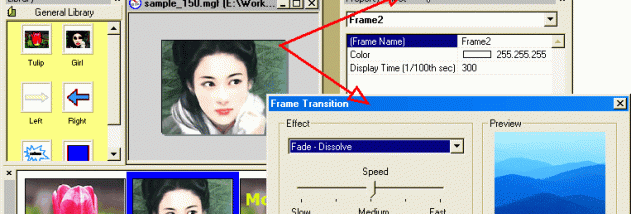

MotionGIF is a Windows application for creating animated GIFs for web pages and other uses. It brings drawing, painting, image editing and frame-based animation into one workspace, making it suitable for users who want to build animations from their own graphics, photos or pictures rather than rely on a single static image. The program supports both scalable vector drawing objects and imported raster images, so elements can be combined in one composition.
Images can be added by dragging them from a local drive or from the Internet, then arranged into an animation. MotionGIF provides transition effects for moving between frames, including fade and dissolve, as well as a collection of 48 built-in visual effects. These effects help create changes in appearance without requiring each frame to be drawn from scratch. Transparency is supported, including a selectable transparent color for GIF output.
The drawing and image tools provide options for adjusting the appearance of individual elements. Drawing objects can be made translucent, while imported images can retain transparency or use adjustable opacity to blend with other content. Text tools support adding labels and captions, and image-processing features allow pictures to be edited as part of the animation workflow. A background layer can be used across all frames, which helps keep a consistent scene while foreground objects change.
Reusable objects can be saved in a personal library and dragged into other MotionGIF projects. This is useful for repeated logos, decorations or interface elements, and reduces the need to recreate common parts of an animation. The combination of reusable assets, shared backgrounds and visual effects can help with making web banners, animated buttons, simple illustrations and other short looping graphics.
MotionGIF is trialware. The available operating-system information includes Windows 10; it does not establish support for Windows 11. The program creates animated GIF files and is intended for users who need an editor that combines imported imagery with drawing and animation tools.