Cok Free MP3 Recorder
Welcome to the home of Cok Free MP3 Recorder, a top-notch software developed by Cok Software, ... meetings, this software has got you covered. Cok Free MP3 Recorder stands out due to its user-friendly interface, ...

Mp3Splt divides MP3 and Ogg files into shorter tracks without decoding them. Users can set start and end times manually, split albums using CUE, XMCD or CDDB track data, or use Audacity labels. Silence detection and fixed-length splitting offer automatic alternatives. The GTK interface includes playback, a waveform progress bar and visible split points; a command-line tool supports terminal workflows and batch processing.
| Author: | Matteo Trotta |
| License: | Open Source |
| Price: | FREE |
| Released: | Mar 15, 2017 |
| File size: | 1.80 MB |
| Downloads: | 489 |
| Keywords: | mp3 splitter, cue file audio splitter, ogg file splitter, Mp3Splt, open-source audio tool, split album into tracks, Mp3 Splt, x64 software, Matteo Trotta, split, split ogg, silence detection audio splitter, mp3, splt mp3, Windows 10 compatible, audio splitting, splitter, split mp3 without decoding |
| Author URL: | http://mp3wrap.sourceforge.net/ |

Mp3Splt is an audio-file splitter for people who need to divide MP3 or Ogg files without decoding them first. It can separate a long recording into shorter sections or turn a continuous album file into individual tracks. The project includes a command-line tool for scripted or terminal-based work and a GTK graphical interface for users who prefer to set split points visually.
For a manual split, the user selects the start and end times for each section and can choose where the resulting files are saved. Album tracks can be named and divided using split points from a local CUE, XMCD or CDDB file, or by retrieving track information from the freedb service. Audacity label files can also provide split positions. These options are useful when an album's track boundaries are already recorded in a file or its online database entry, avoiding the need to enter every time and filename by hand.
Automatic silence detection can find quiet gaps and create splits, and it can also help adjust positions supplied by CUE or CDDB data. For recordings that need evenly sized sections, Mp3Splt can split files at a fixed time interval. It also handles concatenated MP3 files and files made with Mp3Wrap or AlbumWrap, including extraction of the original tracks from those wrapped files. MP3 variable bit rate is supported, and the program can process multiple files recursively.
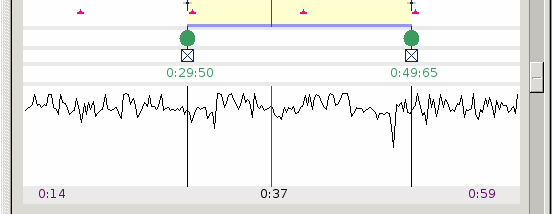
The GTK interface adds an integrated player and a zoomable progress bar with an amplitude waveform and visible split points. Listening and inspecting the waveform can help users check where a cut should fall before creating the output tracks. The interface also supports control through SnackAmp and Audacious. MP3 tag handling includes both ID3v1 and ID3v2, which is useful when working with tagged tracks; an output directory can be selected to keep the separated files together.
Mp3Splt suits users organizing albums, breaking long recordings into clips, or processing batches of audio files. Its command-line program can fit repeatable workflows, while the graphical version offers playback and visual editing. The project is open source and is available for Windows, Linux and Mac OS X; the Windows operating systems include Windows 10. It works with MP3 and Ogg audio and focuses on splitting rather than audio conversion or editing.