Diff Commander
Welcome to the home of Diff Commander, a cutting-edge software solution developed by Nikeware. ... and need a reliable tool to manage file differences. It boasts a user-friendly interface, making it easy ...

NextDiff is a freeware tool for comparing text in two files and highlighting the differences. It handles ordinary text files and can extract text from formats such as PDF, DOCX and PPTX using Apache Tika. Results include a count of equal and different lines, with settings to control case sensitivity, ignore whitespace or blank lines, and change highlight colors. Tika-based format support requires a JDK.
| Author: | TkoSoft |
| License: | Freeware |
| Price: | FREE |
| Released: | Oct 8, 2026 |
| File size: | 3.30 MB |
| Downloads: | 28 |
| Keywords: | document diff tool, diff, NextDiff free download, download NextDiff, difference, comparison, Text Comparison, Comparison Tool, compare docx files, compare two documents, file comparison tool, comparer, NextDiff, File Comparer, text difference checker, compare pdf text |
| Author URL: | https://www.tkosoft.com/products/filebricks |
NextDiff is a freeware file comparison tool for finding changes between two documents. It is intended for people who need to review revisions, check whether files contain matching text, or locate small edits in lengthy documents. Rather than relying on visual inspection, it extracts and compares text, then marks differences so they can be examined directly in the application.
To start a comparison, users select the two files to check. NextDiff supports ordinary text files and can also process document formats such as PDF, DOCX and PPTX through Apache Tika integration. This gives the tool a role beyond comparing plain text, allowing text content from supported office and PDF documents to be checked in the same workflow. The comparison focuses on extracted text; it is useful for reviewing wording and content changes rather than visual page layout or formatting.
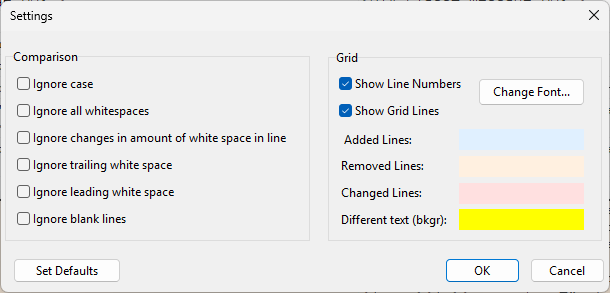
After comparing the files, NextDiff highlights differing text or paragraphs and provides a summary of equal and different lines. The summary offers a quick overview of how much content matches, while the highlighting helps locate the relevant changes without reading both documents from beginning to end. Users can adjust comparison settings to make matching case-sensitive or to ignore whitespace and blank lines. Highlight colors for different lines and text can also be customized, making it easier to distinguish the marked content during review.
These features suit tasks such as checking edited drafts, comparing text extracted from office documents, and reviewing changes between document copies. Options to ignore spacing or blank lines can be helpful when layout-related differences would otherwise distract from wording changes; case-sensitive comparison is available when capitalization matters. The results provide a focused text comparison, so they should not be treated as a full visual or formatting comparison of the source files.
NextDiff is free to use and runs on Windows 10 and Windows 11, including 32-bit and 64-bit Windows 10. Apache Tika is used to handle formats such as PDF, DOCX and PPTX, and a Java Development Kit (JDK) is required for Tika to function. Users comparing plain text can use the same basic file-selection and difference-highlighting workflow, while the JDK requirement applies to Tika-based document processing.