NK2Edit x64
NK2Edit x64 is a Windows utility for managing the ... INI files; users can edit the text within NK2Edit or transfer it to another text editor and ...

NK2Edit manages the AutoComplete data Outlook stores in NK2 files. It opens the default profile's file or another selected file, then lets users edit names and email addresses, remove unwanted suggestions, add records manually or from the Outlook address book, and copy entries between files. It can also export data and help recover damaged files.
| Author: | NirSoft |
| License: | Freeware |
| Price: | FREE |
| Released: | Aug 29, 2023 |
| File size: | 440 kB |
| Downloads: | 529 |
| Keywords: | manage outlook autocomplete, Windows 10, NK2, NK2 file editor, outlook autocomplete editor, x64 software, nk2 file editor, Outlook AutoComplete, nk2 file repair, edit outlook email suggestions, NK2 Editor, Edit, Outlook NK2, NK2Edit, export nk2 contacts, Edit NK2, Editor, NirSoft |
| Author URL: | https://www.nirsoft.net/ |
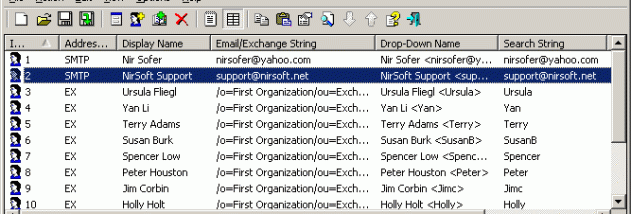

NK2Edit is a Windows utility for managing the AutoComplete data Outlook stores in NK2 files. It is useful when an address is incorrect, an unwanted suggestion keeps appearing, or a profile's saved suggestions need to be moved or recovered. Outlook builds this list as names and email addresses are entered in message fields, but it does not provide a built-in editor for individual NK2 records. NK2Edit opens the file associated with the default Outlook profile automatically, or lets users choose another NK2 file.
The default Table Edit Mode presents records in a grid for routine changes. A record can be opened for editing to correct its display name, email address, Exchange string, drop-down display name, or search string. Users can remove selected entries, rearrange their order, or copy and paste records between files. New records can be entered manually or added from the Outlook address book, making it possible to build a fresh AutoComplete file as well as maintain an existing one. The tool can also remove unwanted single quotation marks from display names and drop-down text.
For more direct editing, Raw Text Edit Mode displays the records in a format similar to a Windows INI file. This mode is intended for experienced users who want to inspect or change the underlying text, including by editing it in another text editor and pasting it back. NK2Edit can export the file's contents to a Unicode text file for review and later conversion back to NK2. It can also export email information in formats including HTML, plain text, CSV, and XML. These options make the data easier to inspect, archive, or use in other tools.
NK2Edit can extract information from damaged NK2 files that Outlook can no longer read and attempt to repair them so Outlook can use them again. This can help when AutoComplete suggestions have stopped working and the stored list needs recovery, rather than simply removing or adding a few entries. Its ability to copy records across files is also useful when consolidating suggestions or setting up another profile with selected contacts.
The program is freeware from NirSoft and is intended for working with Outlook's NK2 AutoComplete files, not for composing or sending email. Its practical use depends on having an NK2 file to edit; it detects the default profile's file on launch and supports opening a different file through its file-open command. The supplied system information includes Windows versions through Windows 11. Changes to address suggestions should be made carefully, particularly when using raw text mode or repairing a file, so that useful entries are retained.