Portable FotoSketcher
... providing high-quality, innovative software. It's not just a photo editing tool, it's a bridge to your artistic expression. Download it today and let your creativity ...

PhotoZoom Classic enlarges digital photographs and graphics using BenVista's S-Spline interpolation technology. Users set new image dimensions, choose a preset for the type of image, and inspect the result in a large live preview. Sharpening can be adjusted manually, and a crop tool can enlarge a selected portion for a close-up. The program is designed for focused image resizing rather than general photo editing.
| Author: | BenVista Ltd. |
| License: | Demo |
| Price: | $69.00 |
| Released: | Dec 5, 2023 |
| File size: | 11.00 MB |
| Downloads: | 313 |
| Keywords: | enlarge, enlarge photos, PhotoZoom Classic, image interpolation, resize digital images, image enlargement software, photo editing tool, zoom, enlarge image, enlarger, high-quality zoom, BenVista Ltd., Windows 10 compatible, photo enlarger, crop and enlarge image, image zoom, reduce noise |
| Author URL: | https://www.benvista.com/ |
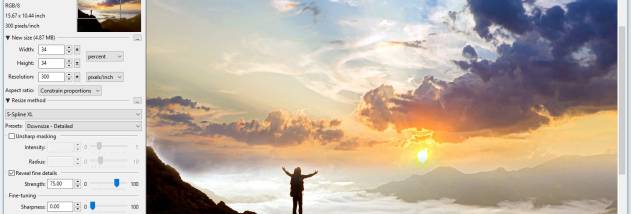

PhotoZoom Classic is an image-resizing program for people who need to enlarge digital photographs or graphics while retaining as much visible detail as possible. Rather than simply stretching pixels, it uses BenVista's S-Spline interpolation technology to calculate the enlarged image. The straightforward workflow is suited to occasional resizing as well as preparing images for closer viewing, print layouts, or other projects that require a larger image.
To begin, the user opens an image and sets its new dimensions. PhotoZoom Classic offers presets tailored to different kinds of photos and graphical images, providing a quick starting point without requiring detailed knowledge of resizing methods. A large preview shows how the result will look with the current settings, so adjustments can be evaluated before the enlarged image is saved. This makes it easier to compare settings and choose a result that suits the source image and intended use.
For more control, the program lets users fine-tune sharpening. This helps balance edge definition against a softer appearance, rather than applying one fixed sharpening level to every image. A crop function can isolate a particular part of an image and resize that selection, which is useful for making a close-up without enlarging the entire picture. Presets, manual adjustment, cropping, and the live preview work together in a compact editing workflow focused on image enlargement.
PhotoZoom Classic can be used to make small photographs easier to view, prepare a selected detail for use as a larger image, or scale graphical artwork to a different size. The preview is especially useful when the source image has limited detail: users can inspect the enlargement and adjust the settings before committing to the output. It is a dedicated resizing tool rather than a general photo editor, so its main purpose is changing image dimensions and tuning the appearance of the enlarged result.
The software is distributed as a demo and is available for Windows, including Windows 10 and Windows 11. Its simple interface and image-specific presets make the resizing process accessible, while manual sharpening controls give users an option to refine results. PhotoZoom Classic is most relevant when enlargement is the primary task and a preview-driven workflow is preferable to resizing through a broader image-editing application.