Potrace for Windows (x64 bit)
Potrace is a command-line utility for converting bitmap images into smooth, scalable vector graphics. It is intended for people who need to turn raster artwork, scans, ...

Potrace is a command-line tool that traces PBM, PGM, PPM and BMP bitmaps into smooth, scalable paths. It can export EPS, PostScript, SVG, PDF, XFig, DXF, GeoJSON, GIMP paths and PGM. Users can tune speckle removal, corner handling, curve optimization, scale and output dimensions, making it useful for digitizing logos, handwriting and other high-contrast artwork.
| Author: | Peter Selinger |
| License: | Open Source |
| Price: | FREE |
| Released: | Sep 17, 2020 |
| File size: | 174 kB |
| Downloads: | 612 |
| Keywords: | bitmap tracing tool, User-friendly interface, bitmap to vector converter, image converter, Windows 10 compatibility, Bitmap-to-vector conversion, converter, convert, Potrace vectorization, Peter Selinger software, potrace windows, bmp converter, bmp2vector, bmp to svg converter, convert image to eps, bitmap to vector, Open-source application, command line vectorizer |
| Author URL: | http://potrace.sourceforge.net/ |
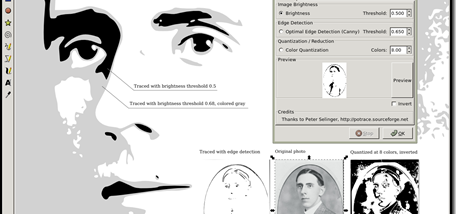

Potrace is a command-line bitmap tracing utility for designers, illustrators, developers and others who need to turn pixel-based artwork into scalable vector paths. It reads PBM, PGM, PPM and BMP images, then traces their shapes into smooth outlines. Unlike a bitmap, which can look jagged when enlarged, the resulting vector artwork can be rendered at different sizes while retaining clean edges. It is particularly useful for converting high-contrast source material such as scanned logos, handwriting and simple illustrations.
The program can write several vector and document formats, with EPS as its default output. Other available backends include PostScript, SVG, PDF, XFig, DXF, GeoJSON and GIMP paths; PGM output is also available for antialiasing workflows. The backend is selected with a command-line option, and an output filename can be set directly. This lets users prepare artwork for different destinations, such as SVG for vector editing, PDF for document workflows, or EPS and PostScript for print-oriented processes.
Tracing behavior can be adjusted to suit the source image. A speckle-suppression setting removes small stray marks, while the turn policy controls how ambiguous shapes are divided into paths. Corner threshold and curve-optimization options affect the balance between preserving sharp details and smoothing outlines. Users can also disable curve optimization, set output precision, and adjust scale, width, height, page size or resolution where the selected format supports those controls. These options make it possible to refine a trace without manually redrawing each contour.
Potrace runs from a command prompt rather than offering a graphical editing interface. It accepts one or more input filenames, so repeat conversions and scripted workflows can be handled from the command line. Its debugging output can help users inspect tracing behavior, and its help and license options provide command reference and licensing information. The tool is suited to digitizing monochrome graphics, preparing bitmap marks for vector-based editing, and producing scalable paths from scanned notes or line art; it is not a general-purpose photo editor or a tool for creating full-color vector illustrations.
Potrace is open-source software distributed under the GNU General Public License. The Windows utility is a compact download and is intended for command-line use, so users should be comfortable entering commands and selecting options rather than relying on menus. Input and output formats depend on the chosen file type and backend, and page or resolution settings apply only where supported. The supplied Windows compatibility information includes Windows 10; no Windows 11 support is asserted here.