Portable PStart
PStart is a lightweight application launcher that keeps shortcuts ... shortcuts tied to one computer, they can use PStart as a central menu for the items they ...

PStart is a tray-based launcher for user-selected applications, documents, and folders. Install it on a Windows PC to create an additional start menu with quick program search, or place it on a USB drive to organize portable software. In portable mode, relative paths keep entries working when the drive letter changes between computers.
| Author: | Workstation Master |
| License: | Trialware |
| Price: | $1.49 |
| Released: | Oct 26, 2026 |
| File size: | 322.00 MB |
| Downloads: | 306 |
| Keywords: | portable application launcher, launch apps from usb, quick program search, Windows 10 compatible, application launcher, usb program launcher, program starter, tray application launcher, PStart, deploy, x64 software, portable software menu, launcher, portable utilities, launch, PEGTOP Software, launch program |
| Author URL: | https://workstation-master.com/power-mode-switcher.html |

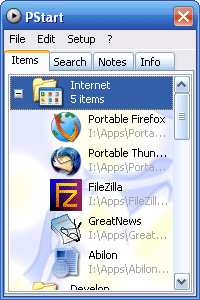



PStart is a lightweight application launcher for organizing and opening programs, documents, and folders from a central menu. It is useful for people who want quick access to frequently used software on a Windows PC, as well as for users who carry portable applications on a USB drive or other removable media.
The launcher stores user-defined entries in a menu accessible from the system tray. Add the programs and files that matter, then start them from the menu instead of browsing through folders or shortcuts. When installed on a computer, PStart can serve as an additional start menu and includes a quick program search feature for finding entries.
PStart can also be installed on removable storage to provide a portable menu for compatible applications. In portable mode it uses relative paths, so entries can continue to point to files on the same device even when Windows assigns that device a different drive letter on another computer. The same approach can be useful for content launched from removable disks, including CDs whose drive letter may vary.
A portable menu can bring together applications, important documents, and folders in one place. It suits users who move between computers, keep work tools on a USB stick, or want a compact launcher for software stored on removable media. It can also organize commonly used items on a local PC without replacing the standard Windows Start menu.
PStart is freeware from PEGTOP Software. The installer offers a choice of local or removable-device installation, and the program is intended for Windows. Applications launched from removable storage must themselves be able to run in that environment; PStart's relative paths help locate files but do not make otherwise non-portable software portable.