RIOT Portable
RIOT Portable, the Radical Image Optimization Tool, is a ... estimate are available during adjustment. These tools make RIOT useful for preparing web graphics, reducing image storage ...

RIOT is a freeware image optimizer for reducing file sizes before images are used on websites or shared. It supports JPEG, GIF and PNG, with separate controls for compression quality, color reduction and metadata. Users can drag in files or select them through a browser, then process images individually or in batches. Resizing, rotation, flipping and visual adjustments are also available.
| Author: | Lucian Sabo |
| License: | Freeware |
| Price: | FREE |
| Released: | Oct 1, 2026 |
| File size: | 37.60 MB |
| Downloads: | 364 |
| Keywords: | Batch processing feature, Optimization, batch image compression, RIOT optimizer, Image compression tool, Optimize, Windows 10 compatible, image compression tool, resize and resample images, reduce image file size, jpeg png gif optimizer, Optimize Image, image optimizer, Image Optimization, User-friendly interface, Lucian Sabo software, Image Optimizer, Optimizer |
| Author URL: | https://luci.criosweb.ro/ |





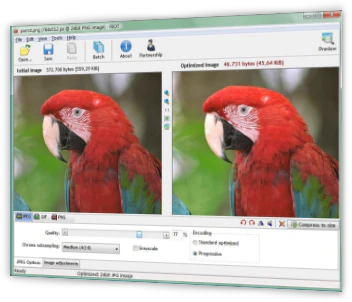

RIOT is an image optimizer for people preparing pictures for websites or other uses where file size matters. It helps reduce image files while letting users compare format-specific settings and visual adjustments. Images can be opened through a file browser or dragged into the application, and batch processing provides a way to handle multiple files in one workflow rather than editing them individually.
Options depend on the image format. For JPEG files, RIOT can adjust compression quality and chroma subsampling, apply a grayscale filter, and change brightness, contrast or gamma. These controls let users balance smaller files against appearance, then inspect the result at different zoom levels. Metadata settings can remove information such as IPTC data and EXIF profiles, which can also reduce unnecessary embedded content when preparing files for distribution.
For GIF and PNG images, the application provides color-reduction controls. Users can choose a method, set the number of colors and select a color-quantization algorithm, tailoring the palette to the image. Additional tools include resizing through resampling, rotation and flipping. The interface supports full-screen viewing and a dual-view option, so users can adjust how they inspect an image during optimization. RIOT can also work with external optimizers, adding another step to an image-processing workflow.
The tool is suited to web publishers, designers and anyone who needs to make image files smaller while retaining control over output settings. Batch mode is useful for preparing collections of images, while individual adjustments suit one-off edits. The format-specific controls make it possible to use different approaches for photographic JPEGs and palette-based GIF or PNG graphics.
RIOT is freeware for 64-bit Windows 10 and Windows 11. It includes a help file with practical hints and is designed to use a low-to-moderate amount of system resources. Its focus is image optimization rather than general photo editing, so its tools center on compression, color reduction, metadata, resizing and basic image adjustments.