Mouse Recorder
... full potential of your Windows 10 experience with Mouse Recorder, an innovative software developed by Robot Soft Studio. This powerful tool allows you to automate repetitive tasks effortlessly by recording your mouse movements ...

Rusty AutoClicker is an open-source Windows utility that automates repetitive mouse clicks. Users can set the interval, choose single, double or triple clicks, and direct the action to a specific screen position. Keyboard shortcuts start and stop clicking without switching windows. It can help with routine data entry, simple testing and repetitive in-game actions.
| Author: | Delivery-Klad |
| License: | Open Source |
| Price: | FREE |
| Released: | Nov 26, 2025 |
| File size: | 9.30 MB |
| Downloads: | 157 |
| Keywords: | automatic, autoclicker, open source autoclicker, clicker, Rusty AutoClicker, download Rusty AutoClicker, mouse, Automate Click, autoclicker with hotkeys, clicking, automatic mouse clicker, auto, GitHub, productivity, automation, Automatic Clicker, mouse click automation, rusty autoclicker, user-friendly, Mouse Clicker, Rusty AutoClicker free download, MrTanoshii, customizable, repetitive click tool, open-source |
| Author URL: | https://github.com/Delivery-Klad/autoclicker |

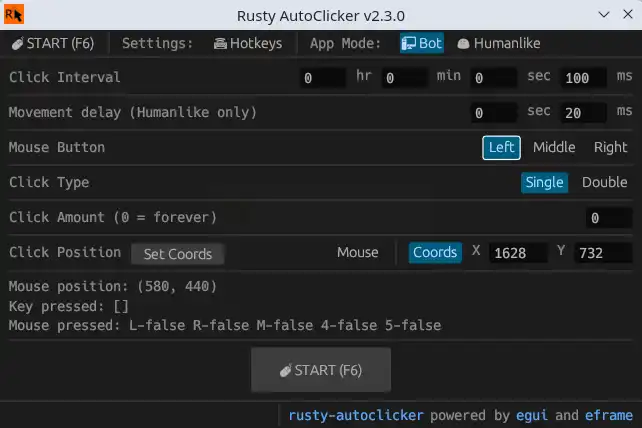

Rusty AutoClicker is an open-source Windows utility for automating repeated mouse clicks. It is suited to people who need a sequence of clicks during gaming, data entry, testing or other repetitive computer tasks, and want to control the timing and location without repeatedly pressing the mouse button themselves.
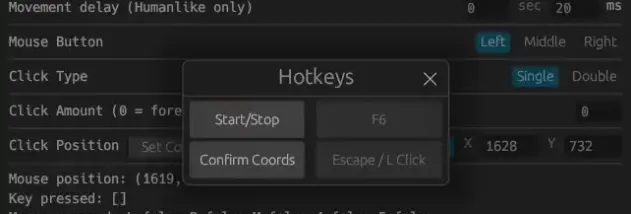
The click interval can be adjusted to match the task, from closely spaced clicks to a slower pace. Rusty AutoClicker can perform single, double or triple clicks, so the selected action can fit different controls and interface elements. Users can also choose a specific screen position as the click target, which is useful when a task repeatedly interacts with the same button or area.
Keyboard shortcuts provide a way to start and stop automation without switching back to the program window. This can be practical when the target application occupies the screen, or when clicks need to run while the user keeps their hands on the keyboard. The interface is designed around setting up these basic parameters, making the tool accessible for straightforward automation without requiring scripting.
Typical uses include repeating an in-game action, automating routine form or data-entry interactions, and carrying out simple tests that require clicks at a fixed location. The chosen interval, click type and target position determine how the automation behaves, so settings can be adapted to the application rather than relying on one fixed clicking pattern. As with any automated input, users should ensure that repeated clicks are appropriate for the application and do not trigger unintended actions.
Rusty AutoClicker is free and open source, allowing its source code to be inspected or modified. It supports Windows 10 in 32-bit and 64-bit editions and Windows 11. The program is intended for mouse-click automation; it does not replace broader workflow automation tools for tasks involving complex sequences or decision-making.