BlueStacks App Player
BlueStacks App Player runs Android apps and games on a Windows computer, making it useful for mobile gamers, app testers and people who want Android software on ...

Phone Link connects a compatible smartphone to a Windows PC, bringing selected mobile tasks to the desktop. Users can read and send text messages, view notifications, manage calls and access recent phone photos without constantly switching devices. Supported phones may also provide screen or app access and content transfer features. The available functions vary by phone. Phone Link is freeware for Windows 10 and Windows 11.
| Author: | Microsoft |
| License: | Freeware |
| Price: | FREE |
| Released: | Jan 16, 2026 |
| File size: | 292.70 MB |
| Downloads: | 214 |
| Keywords: | synchronize Android, text from windows pc, phone notifications on pc, Microsoft, Phone Link free download, Android, phone link for pc, Windows 10, app, communication, synchronization, SMS-it, connect android to pc, download Phone Link, Windows, phone photos on computer, manage calls on pc, Android to PC, software, messaging, view photo, Android2PC, Phone Link, connectivity, synchronize |
| Author URL: | https://www.microsoft.com |


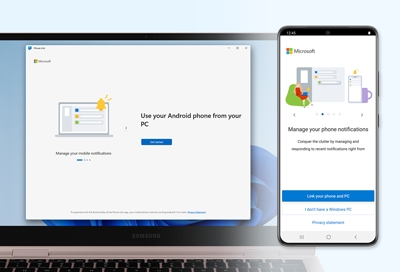

Phone Link connects a compatible smartphone to a Windows PC, giving users a way to handle selected phone tasks from the desktop. It is intended for people who want to check messages, notifications, calls and photos without repeatedly switching between devices. After pairing the phone and computer, its dashboard brings supported mobile activity into one place; the features available depend on the phone and its compatibility.
Message access lets users read and send text messages from the PC, while phone notifications can appear alongside desktop work. This can be useful for checking incoming activity while typing or working in another application. Notification handling and messaging are not a replacement for every phone app, and the available actions can vary by device. Call integration lets users make and receive calls through the computer, typically using a paired phone and suitable audio hardware, so conversations can be managed without picking up the handset.
Phone Link also provides access to recent phone photos, making it easier to review images on a larger screen and bring them into PC tasks. Supported phones offer additional ways to interact with mobile content, including screen access or app use on the computer; these capabilities are device-dependent rather than universal. Where supported, moving content between the phone and PC helps with everyday tasks such as transferring a photo into a document or sharing a file between devices. Pairing and connection are central to the workflow, so the phone must remain available and connected for linked functions to work.
Typical uses include responding to texts while working at a desk, checking phone alerts during computer tasks, handling calls from the PC, and viewing or using phone photos in desktop workflows. The shared interface is useful for reducing device switching, but it does not make every mobile app or feature available on Windows. Phone Link is freeware from Microsoft for Windows 10 and Windows 11. It is designed to connect Windows PCs with compatible Android or iOS phones, with broader functionality on supported Android devices; exact features depend on the phone, its software and the connection in use.