Pixel Art
... deliver a seamless user experience. It's compatible with Windows 10, ensuring smooth operation and optimal performance. Dive into the captivating world of pixel art with Pixel ...

Songview manages song libraries and projects lyrics for worship services, meetings and other events. Browse by number or title, search lyrics, authors and song names, preview results, and add selections to a playlist. Songs can be imported, edited or added through Song Select. Operators can also correct a slide while projection continues.
| Author: | Roger Bowser |
| License: | Freeware |
| Price: | FREE |
| Released: | Jun 4, 2019 |
| File size: | 92.70 MB |
| Downloads: | 370 |
| Keywords: | Roger Bowser, song projection software, project song, song projection, hymn presentation, projector, Windows 10, song lyric editor, worship presentation, projection, lyrics projector, Songview, song projector, church service software, lyrics, song library manager, x64 software, hymn projection |
| Author URL: | http://www.logos-solutions.org.uk/ |
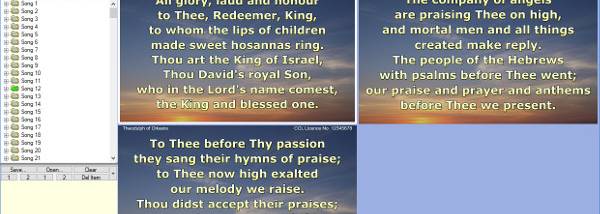

Songview is a song and lyric projection program for worship services, meetings and other events where an operator needs to find and display song verses. It combines a song library, search tools, a playlist and preview windows, so songs can be selected and queued before they appear on the projection screen. The program includes a file of public-domain songs, and users can build a library of their own by entering songs or importing them from supported formats.
The library can be browsed by song number or title. Number browsing suits collections organized like a hymn book, while title browsing helps locate a song by name. A full-text search checks song words, titles and authors; it can also find songs containing every word in a search list. Hovering over a result reveals its lyrics, which helps distinguish versions before selection. A click opens a song in the preview windows, and it can then be added to the playlist by dragging it there or using the context menu.
Songview includes tools for maintaining the library as well as presenting it. Its song editor allows songs to be added or changed, and a search-and-replace function can update repeated spellings across a collection in one operation. For a quick correction during a presentation, the operator can right-click the projected slide, edit its text and close the editor without stopping the slide display. Song Select integration provides another way to add missing lyrics. Once a preferred song file has been chosen, a setting can make Songview load it automatically at startup.
These features support both preparation and live operation: an organizer can collect and edit songs in advance, find the right version through lyric previews, and arrange selected material in a playlist for an event. During projection, the preview and direct slide editing tools make it possible to check or correct content while continuing to show slides. Number-based browsing is useful for requests identified by hymn-book number, while text search is suited to larger libraries where a title or lyric fragment is easier to remember.
Songview is freeware and is intended for Windows. The supplied compatibility information includes Windows Vista, Windows 7, Windows 8 and Windows 10, including their 64-bit editions. Its song collection and projection workflow depend on the user maintaining an appropriate song file; the included public-domain material provides a starting point, and imported or manually created content can extend it. The program is focused on lyrics and song slides rather than general-purpose presentation authoring.