SyncBack SE
SyncBack SE is a file backup, synchronization and restore utility for Windows users who need ... they should go, making it suitable for routine backups as well as keeping selected folders consistent between ...

SyncBack Pro backs up, synchronizes, and restores files between drives, network locations, removable media, FTP servers, and ZIP files. Jobs are organized as profiles, with Easy and Expert modes for different levels of control. Users can schedule runs, filter files, select subdirectories, compare and verify copies, and review detailed logs. Simulations help check a backup or restore before it runs, and results can be emailed.
| Author: | 2BrightSparks Pte Ltd |
| License: | Trialware |
| Price: | $54.95 |
| Released: | Apr 20, 2021 |
| File size: | 31.60 MB |
| Downloads: | 278 |
| Keywords: | backup removable media, file backup software, zip, file backup, synchronization, Windows 10 compatible, task scheduling, file synchronization, data backup, file synchronization tool, backup software, scheduled backup utility, advanced customization, SyncBack Pro, backup, sync, 2BrightSparks Pte Ltd, restore files from backup, synchronisation, ftp backup program, backup to zip file |
| Author URL: | https://www.2brightsparks.com/ |
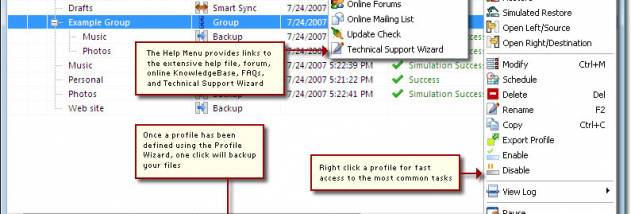

SyncBack Pro is a file backup, synchronization, and restore utility for people who need to keep copies of important files on separate storage or network destinations. It organizes jobs into profiles, letting users configure different routines for different folders, devices, or purposes. An Easy Mode provides a straightforward route for common backup, restore, and synchronization tasks, while Expert Mode exposes more detailed controls for users who need to tailor how files are handled.
A profile can copy files to another drive, a networked drive, removable media, an FTP server, or a ZIP file. These destinations suit different workflows: an external or removable drive can hold a local copy, a network location can serve as shared storage, and an FTP server can receive files remotely. Synchronization helps keep selected files or folders aligned between locations, while restore jobs provide a way to copy backed-up files back when needed. Profile groups help organize related jobs, and task scheduling can automate recurring work rather than requiring every run to be started manually.
Before committing changes, users can run simulated backups or restores to review the planned operation. File comparison and copy verification provide additional checks when deciding what to copy and confirming that copied files match. File filters and sub-directory selection narrow a job to the material that matters, which is useful for excluding temporary files or limiting a backup to chosen parts of a folder tree. Profiles can also run in the background, and the option to close programs automatically can help when files need to be free for copying.
Detailed log files record the outcome of each run, and SyncBack Pro can email results so users can check completed jobs without opening the application. These features are useful for routine protection of personal documents, keeping work folders synchronized, and managing scheduled copies to local, removable, network, or FTP storage. Easy and Expert modes make the same application suitable for occasional straightforward tasks as well as more carefully configured backup routines.
SyncBack Pro is trialware from 2BrightSparks. The supplied operating-system compatibility information includes Windows Vista, Windows 7, Windows 8, and Windows 10, including their listed 64-bit editions; Windows 11 compatibility is not established here. The interface and help are available in multiple languages, including English, French, German, Spanish, Italian, Dutch, Polish, Portuguese, Chinese, Japanese, and others. Its mix of destination choices, scheduling, verification, and reporting makes it useful where backup jobs need more control than a basic folder copy.