Template Phrases for Microsoft Outlook for Windows 10 - Full description
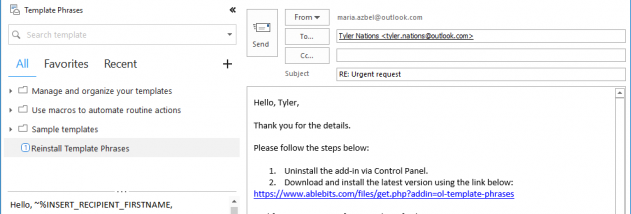
Template Phrases for Microsoft Outlook is an add-in for people who send or answer many similar emails. It stores reusable text snippets and message templates in Outlook, so support staff, sales teams and other frequent email users can insert standard wording instead of typing it again. The add-in is available while composing a new message or replying, placing its template pane inside the message window.
Templates appear in a multi-level tree of folders and subfolders. Selecting an entry shows its full text, and a click inserts the chosen phrase or block into the message. Users can also create templates from the pane, making it practical to save a newly written response for later use. The tree can hold short expressions, recurring explanations and fuller email text, letting people keep reusable material organized by topic or task.
Templates can do more than add body text. Built-in macros can add attachments and fill the To, CC, BCC or Subject fields, as well as request read or delivery receipts. These actions combine routine message setup with a stored template, reducing repeated manual steps. Shared templates can be kept in a network folder and added to the template tree by multiple users, helping a sales or support team work from common wording while retaining personal templates.
For large or irregular collections, the Search tab filters templates as keywords are typed, including matches containing only part of a word. Favorites provides a manually organized collection of frequently used entries, while Recently used is populated automatically. Together, these options offer several ways to find a template without browsing the entire folder structure each time.
Template Phrases is trialware and works as an add-in for Microsoft Outlook on Windows. Its listed operating-system support includes Windows 10; Windows 11 compatibility is not established here. It is intended for users who want reusable text and message actions within Outlook rather than a separate email client. The add-in is most useful when recurring replies, standard fields or team-wide templates are a regular part of email work.